What is API key rotation, and how do you automate it?
Rotation, regeneration and revocation are three different operations, and only one of them keeps your traffic alive. What rotation actually means, how to pick a schedule you can defend, and what has to be true about a provider's API before any of it can be automated.

Sorower
Co-founder
In this article
- What is API key rotation?
- Why rotation exists, and the honest version of why
- Doesn't rotating more often always help?
- How often should you rotate API keys?
- The overlap window is the whole trick
- What if the provider only has one key slot?
- Three questions that decide whether you can automate this
- How to automate API key rotation: the four-step machine
- The fifth step AWS does not give you
- What your secret manager actually does for you
- The other side: rotation you offer your customers
- Questions you will actually hit
- When my automation says "rotated," is the old key dead?
- Should the new key have the same permissions as the old one?
- How do I test a rotation without gambling with production?
- Key takeaways
- Try the overlap window on something real
Somebody pastes a production key into a public Slack channel. You have a runbook for this. You open it, step one says "generate a new key," you do that, and now you have a new key and eleven services still authenticating with the old one. Four of them belong to a team that is currently asleep.
That is the moment most people discover that API key rotation is not one operation. It is at least four, they have different names, they have very different blast radii, and reaching for the wrong one during an incident is how a security fix turns into an outage.
So let's do this properly. What does rotation actually mean, how often should you really do it, and which parts of it can a machine handle without waking anyone up?
What is API key rotation?
API key rotation is replacing the value of a credential with a new one while everything that authenticates with it keeps working. Generating a fresh random string is the easy half and takes microseconds. The second clause is the entire engineering problem.
Four operations get called "rotation" in casual conversation, and only one of them is rotation:
| Operation | New value? | Old value still works? | Reach for it when |
|---|---|---|---|
| Rotation | Yes | Yes, for a defined window | Routine hygiene, someone left the team, a compliance clock |
| Regeneration (reroll) | Yes | No, dies instantly | You need a new value and you control every consumer of it |
| Revocation | No | No | The key is public and you accept the breakage |
| Expiration | Not until you act | Until a deadline the provider enforces | You want the deadline to be someone else's problem |
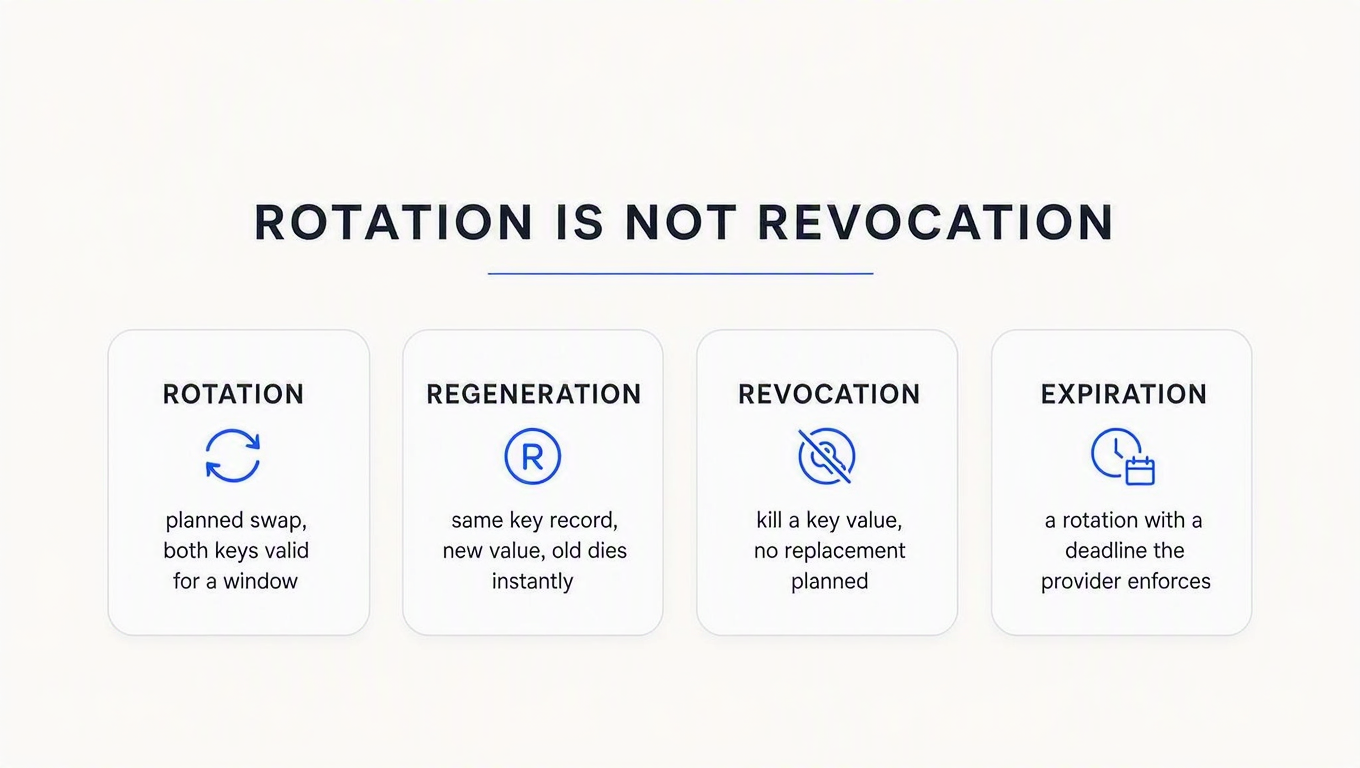
The column that decides everything is the third one. Rotation is defined by the overlap. If the old and new values are never valid at the same instant, you did not rotate anything; you cut over, and the difference between those two words is measured in failed requests.
Which brings us to the first uncomfortable truth: most of the buttons labelled "rotate" in most dashboards are regenerate buttons. They mint a new value and kill the old one in the same instant. That is exactly right during an incident and exactly wrong on a Tuesday afternoon.
Why rotation exists, and the honest version of why
The standard answer is that keys get compromised and rotation limits the damage. True, but too vague to act on.
The precise version: rotation puts an upper bound on how long a compromise you have not detected can be exploited. That is the whole security value. Which gives you a formula nobody bothers to write down:
exposure = min(time to detect a leak, time to next rotation)
Read that twice, because it has a sharp edge. If your secret scanning catches leaked keys within a day, then moving from a 90-day to a 30-day rotation schedule improves your exposure bound by precisely nothing. The min() is already pinned by detection. You tripled the work and bought zero security.
The reverse also holds. If you have no leak detection at all, your rotation interval is your exposure bound, and "every 90 days" means an attacker holding your key gets up to 90 days of free use.
Doesn't rotating more often always help?
No, and this is where the industry advice quietly falls apart. Every rotation is a change to production authentication, and changes to production authentication have a failure rate above zero. At some interval the outages you cause exceed the breaches you prevent. Nobody can tell you exactly where that line sits, but it exists, and "rotate everything weekly, by hand" is comfortably on the wrong side of it.
There is a standards-shaped hint here worth reading carefully. NIST SP 800-63B, section 5.1.1.2, says: "Verifiers SHOULD NOT require memorized secrets to be changed arbitrarily (e.g., periodically)." The very next sentence: "However, verifiers SHALL force a change if there is evidence of compromise of the authenticator."
Now the honest caveat, because this gets misquoted constantly: that guidance is about memorized secrets, meaning passwords, and the reasoning does not transfer cleanly. Forced rotation makes humans pick worse passwords. A 32-byte random API key does not get weaker because you kept it around. What does transfer is the shape of the advice: rotation on evidence is mandatory, and rotation on the calendar is a compensating control for detection you do not have. Treat your schedule as a floor, not as a strategy.
How often should you rotate API keys?
Every article says 90 days. None of them say where 90 came from. Derive it instead, from three inputs: how fast you detect a leak, how much a leaked key can do, and how expensive one rotation is.
| Where the key lives | Who deploys the change | Realistic cadence | The actual constraint |
|---|---|---|---|
| Your CI/CD and backend services | You | 30–90 days, automated | None, once it is automated. This is the easy case. |
| A customer's infrastructure | Them | 6–12 months, long overlap | Their release calendar. You are a guest in it. |
| A mobile or desktop app you shipped | Nobody, for old builds | Effectively never | Users who never update. Plan expiry at build time, or do not ship keys. |
| A partner integration under contract | A procurement process | Annually, scheduled far ahead | Paperwork moves slower than your key does. |
Second uncomfortable truth: the right rotation interval is the shortest one you can hit with no human in the loop, and not one day shorter. If a rotation needs a person, the schedule you wrote down is fiction. The runbook rots faster than the key does, and you find out during the incident.
The overlap window is the whole trick
The overlap window is the period during which both the old and new key validate. Its length has to exceed the slowest consumer's deploy cycle, plus however long you need to confirm they actually moved.
Here is the part that almost nothing on the first page of Google will tell you: the overlap window is a property of the provider's API, not of your automation. You cannot script your way to an overlap the provider does not offer. If all they give you is a Regenerate button, then your very best automation produces a cutover with a gap equal to your deploy time. That is the ceiling, and no Lambda function raises it.
When a provider takes this seriously, it shows up as an actual parameter. Paddle's rotation integration exposes gracePeriodSeconds, accepting 0 to 86400 with a default of 300. And then there is the detail I genuinely admire: "The grace period countdown starts when the new key is first used successfully." Not when you triggered the rotation. That is the correct design, because a timer that starts at rotation punishes you for a slow deploy, while a timer that starts at first successful use measures the thing you actually care about.
What if the provider only has one key slot?
Then you move the overlap into your own client. Hold both values, try the new one first, fall back to the old on an auth failure, and remove the fallback once you have seen the new key succeed. Paddle documents exactly this pattern for the manual path: "Store both your new and old API keys so they're available at the same time. Set up your code to try the new key first, but use the old key as a backup if anything goes wrong."
It works. It is also a workaround, not a fix, and it has a nasty property: the fallback branch is authentication code that runs almost never and is therefore never tested. Put a deletion date on it the day you write it.
Three questions that decide whether you can automate this
Before writing a single line of automation, interrogate the provider's API for three things.
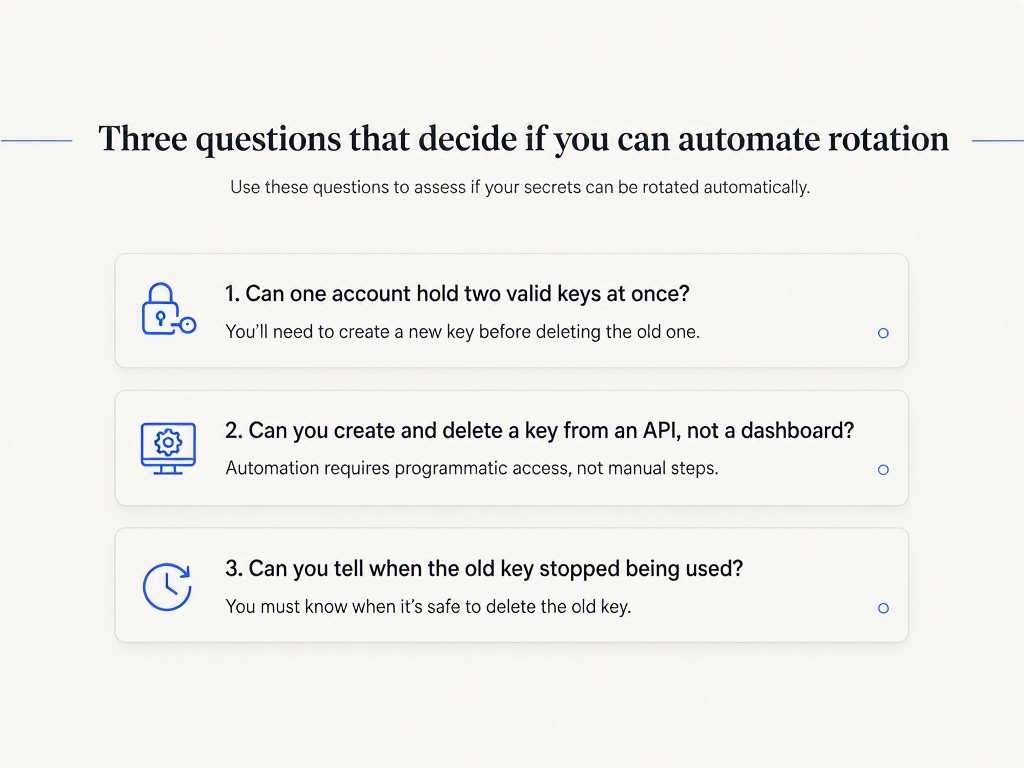
1. Can one account hold two valid keys at once? If not, there is no overlap, there is no zero-downtime rotation, and everything below is unavailable to you. Stop here and go read the client-side fallback section again.
2. Can you create and delete keys from an API, using a credential that is not the key being rotated? A dashboard-only flow cannot be automated at all. And if the only credential able to mint a new key is the key you are replacing, you have a bootstrapping problem the first time a key is genuinely compromised. You need a separate management credential. OpenRouter, for instance, issues management keys separately from the keys they manage, which is the right shape.
3. Can you tell when the old key stopped being used? Without this, your entire verification step is "wait a while, then revoke and hope." Some providers expose a last-used timestamp on the key. Others make you answer it from traffic logs. Either is fine. Nothing is not.
Two out of three still gets you working automation; you just paper over the gap with a fixed wait. Zero out of three means the honest answer is that rotation for this provider is a calendar invite with a human attached, and you should write that down rather than pretend otherwise.
How to automate API key rotation: the four-step machine
Whatever tooling you pick, automated rotation converges on the same four steps, because there are only four things that must happen and they must happen in that order. AWS Secrets Manager names them, so let's borrow the names.
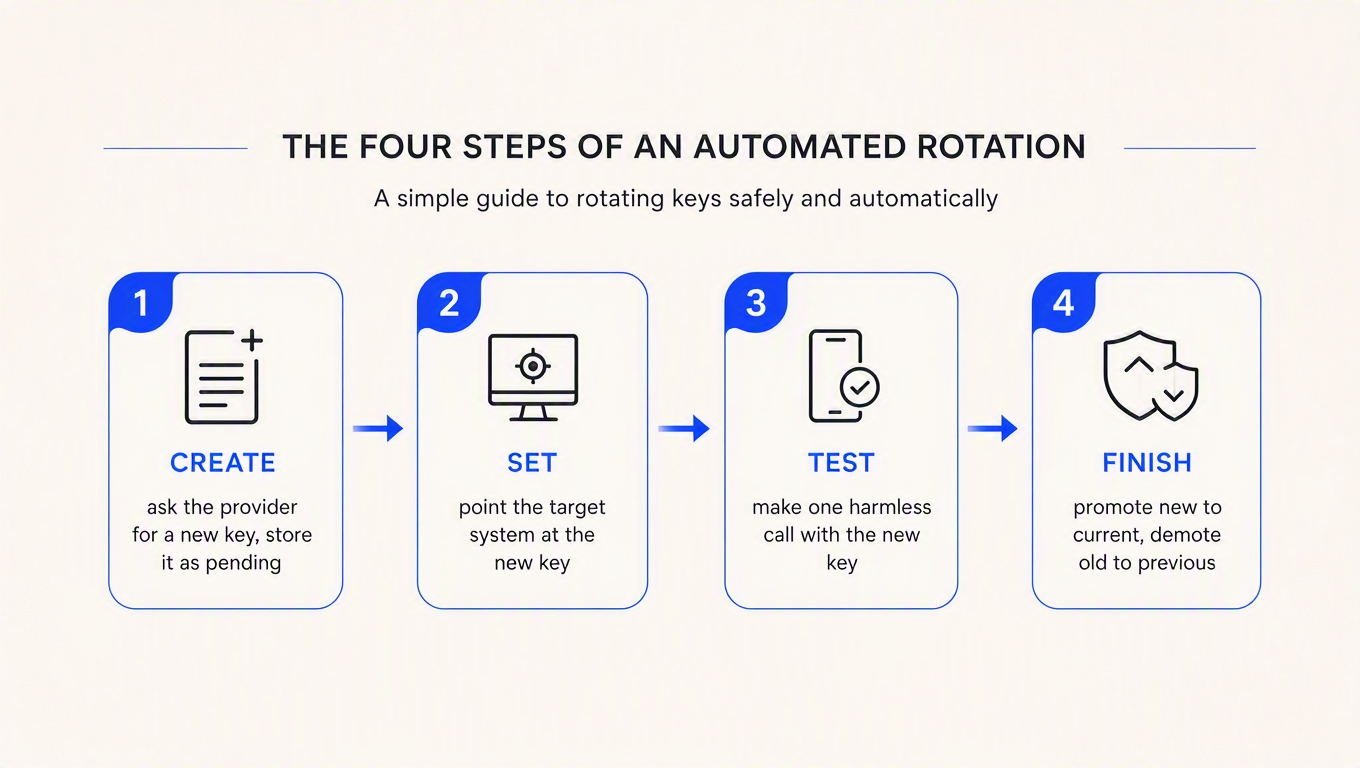
createSecret mints the new value and parks it as pending, not yet in use. AWS stores it under the AWSPENDING staging label and the docs are explicit about why: "Storing the new secret value in AWSPENDING helps ensure idempotency. If rotation fails for any reason, you can refer to that secret value in subsequent calls."
setSecret makes the new credential real on the target system. testSecret uses it for one harmless read. finishSecret promotes it: AWS moves AWSCURRENT onto the new version and "automatically adds the AWSPREVIOUS staging label to the previous version, so that you retain the last known good version of the secret."
Now the part that explains why so many rotation functions are subtly broken. Steps 1 and 4 are bookkeeping inside your own vault. Steps 2 and 3 are where the provider's API decides whether you get a rotation or an incident.
And there is a design mismatch hiding in step 2. This state machine was built for databases, where you choose the new password and push it in. Most API providers work the other way round: they generate the key value and hand it to you. So for an API key, createSecret and setSecret effectively invert. You call the provider's create-key endpoint, and what comes back is what you store as pending. That inversion is why AWS ships a generic template and expects you to write the interesting part yourself.
import json, os, urllib.request, urllib.error
import boto3

sm = boto3.client("secretsmanager")
BASE = os.environ["PROVIDER_BASE_URL"]
MGMT = os.environ["PROVIDER_MANAGEMENT_KEY"]   # NOT the key being rotated


def call(method, path, payload=None):
    body = json.dumps(payload).encode() if payload is not None else None
    req = urllib.request.Request(
        f"{BASE}{path}", data=body, method=method,
        headers={"Authorization": f"Bearer {MGMT}",
                 "Content-Type": "application/json"})
    try:
        with urllib.request.urlopen(req, timeout=10) as r:
            return json.loads(r.read() or b"{}")
    except urllib.error.HTTPError as e:
        # Fail loudly. Secrets Manager retries the whole rotation, and a
        # half-finished rotation that reports success is the worst outcome.
        raise RuntimeError(f"{method} {path} -> {e.code}: {e.read()[:200]}") from e
    except urllib.error.URLError as e:
        raise RuntimeError(f"{method} {path} unreachable: {e.reason}") from e


def lambda_handler(event, context):
    arn, token, step = event["SecretId"], event["ClientRequestToken"], event["Step"]

    if step == "createSecret":
        try:
            sm.get_secret_value(SecretId=arn, VersionId=token,
                                VersionStage="AWSPENDING")
            return                          # an earlier attempt already got here
        except sm.exceptions.ResourceNotFoundException:
            pass

        current = json.loads(sm.get_secret_value(
            SecretId=arn, VersionStage="AWSCURRENT")["SecretString"])

        # Copy the scopes explicitly. Letting them default is how a rotation
        # quietly becomes a privilege escalation you shipped on purpose.
        new = call("POST", "/keys", {"name": f"rotated-{token[:8]}",
                                     "scopes": current["scopes"]})

        sm.put_secret_value(
            SecretId=arn, ClientRequestToken=token,
            SecretString=json.dumps({"key": new["key"], "id": new["id"],
                                     "scopes": current["scopes"],
                                     "retires": current["id"]}),
            VersionStages=["AWSPENDING"])

    elif step == "setSecret":
        # Deliberately empty. Both keys are already live provider-side, which
        # is the only reason this rotation costs zero downtime.
        return

    elif step == "testSecret":
        pending = json.loads(sm.get_secret_value(
            SecretId=arn, VersionId=token,
            VersionStage="AWSPENDING")["SecretString"])
        probe = urllib.request.Request(
            f"{BASE}/me",
            headers={"Authorization": f"Bearer {pending['key']}"})
        with urllib.request.urlopen(probe, timeout=10) as r:
            if r.status != 200:
                raise RuntimeError(f"new key failed verification: {r.status}")

    elif step == "finishSecret":
        stages = sm.describe_secret(SecretId=arn)["VersionIdsToStages"]
        live = next(v for v, s in stages.items() if "AWSCURRENT" in s)
        if live == token:
            return                          # already promoted
        sm.update_secret_version_stage(
            SecretId=arn, VersionStage="AWSCURRENT",
            MoveToVersionId=token, RemoveFromVersionId=live)
After a successful run, the labels tell you the story:
$ aws secretsmanager describe-secret \
    --secret-id prod/billing/api-key \
    --query VersionIdsToStages

{
    "a1b2c3d4-1111-2222-3333-444455556666": ["AWSPREVIOUS"],
    "e5f6a7b8-9999-8888-7777-666655554444": ["AWSCURRENT"]
}
The fifth step AWS does not give you
Look at that output again. The rotation is "complete," and the old API key is still perfectly valid at the provider. Nothing deleted it.
That is not a bug, it is the database assumption showing through one more time. When you rotate a database password, the old credential is overwritten and ceases to exist. When you rotate an API key, the old key is a separate object that lives until something deletes it. So an automated API key rotation needs a fifth step the four-step machine has no slot for: a delayed retirement of whatever is sitting in AWSPREVIOUS.
from datetime import datetime, timezone, timedelta

OVERLAP = timedelta(days=7)   # must exceed your slowest consumer's deploy cycle

def retire_previous(arn):
    """Runs on its own schedule, not inside the rotation function."""
    meta = sm.describe_secret(SecretId=arn)
    rotated_at = meta.get("LastRotatedDate")
    if not rotated_at or datetime.now(timezone.utc) - rotated_at < OVERLAP:
        return "overlap still open"

    prev = next((v for v, s in meta["VersionIdsToStages"].items()
                 if "AWSPREVIOUS" in s), None)
    if prev is None:
        return "nothing to retire"

    old = json.loads(sm.get_secret_value(
        SecretId=arn, VersionId=prev)["SecretString"])
    call("DELETE", f"/keys/{old['id']}")
    return f"retired {old['id']}"
Skip this job and you will accumulate live keys forever, which is a fun thing to discover during an audit. Run it too eagerly and you have reinvented the outage you were trying to avoid.
What your secret manager actually does for you
Here is the third truth, and the one worth internalising: your secret manager probably does not rotate your API keys. It schedules, stores and versions them. The rotation itself is code you write against your provider's API.
| Tool | What happens on the rotation date | What you still write | The catch |
|---|---|---|---|
| AWS Secrets Manager, Lambda rotation | Invokes your function four times, handles versioning and retries | The entire rotation function, once per provider | $0.40 per secret per month plus $0.05 per 10,000 API calls, and a Lambda to maintain forever |
| AWS Secrets Manager, managed external secrets | Everything, including the call to the provider | Nothing | Only works if your provider is one of the ten partners on the list. Same per-secret price. |
| Google Cloud Secret Manager | Publishes a SECRET_ROTATE message to Pub/Sub |
The subscriber, and all of the rotation logic | It does not rotate anything. Minimum rotation period is one hour. |
That Google Cloud row deserves a moment. The documentation is admirably blunt: "You must configure a Pub/Sub subscriber to receive and act on the SECRET_ROTATE messages." The rotation feature is a reminder. A very reliable, IAM-controlled, minimum-one-hour reminder.
The AWS managed external secrets list is the interesting development here, because it is the first time a cloud provider has taken responsibility for the provider-side half. The onboarded partners as documented are BigID, Confluent Cloud, Datadog, GitLab, Jenkins, MongoDB Atlas, Paddle, Salesforce, Snowflake and SonarQube. Ten vendors. If yours is on that list, rotation genuinely is a checkbox and a schedule. If it is not, you are writing the Lambda.
AWS gave this its own re:Invent session, which is a good grounding in why third-party secret rotation is harder than the database case everyone designs for:

The other side: rotation you offer your customers
Flip the telescope around. If you run the API, every question above becomes a list of things you owe the people holding your keys. They will be reading your docs at 2am asking exactly those three questions, and the answers are a product decision you already made, possibly by accident.
In ReqKey the unit that makes this work is the consumer. One consumer per customer, holding any number of keys, all drawing on the same consumer-level credit pool. That last part matters more than it sounds: because the balance lives on the consumer and not on the key, an overlap window costs you no credit migration at all. Two keys, one pool, no arithmetic.
# Issue the twin on the same consumer. Copy allowedApis explicitly:
# omit it and it defaults to ["*"], which is every API in the project.
curl -X POST "https://api.reqkey.com/key/create" \
  -H "Authorization: Bearer reqkey_xxx..." \
  -H "Content-Type: application/json" \
  -d '{
    "consumerId": "cons_A1B2C3D4",
    "allowedApis": ["api_payment", "api_analytics"],
    "prefix": "prod",
    "tag": "rotation-2026-08",
    "metadata": {"replaces": "key_X1Y2Z3A4"}
  }'
Expected response (201 Created):
{
  "key": "prod_N3W4K3Y5V6A7L8U9E0H1E2R3",
  "keyId": "key_B5C6D7E8",
  "createdAt": "2026-08-12T09:12:04Z",
  "status": "active"
}
Then, days later, once the old key has gone quiet, retire it:
curl -X POST "https://api.reqkey.com/key/update" \
  -H "Authorization: Bearer reqkey_xxx..." \
  -H "Content-Type: application/json" \
  -d '{"keyId": "key_X1Y2Z3A4", "status": "disabled"}'
Validation on the retired key then returns 403 with {"valid": false, "message": "Key is disabled"}, which is a far kinder thing for a customer to find in their logs than a generic 401.
Two honest limitations while we are here, since a post that only lists strengths is marketing. First, ReqKey's rerollKey: true is a hard cutover: the old value becomes invalid immediately, with no grace window. It is the leak button, not the rotation button, and if you want an overlap you build it out of two keys as above rather than out of reroll. Second, there is no per-key last-used timestamp, so question three gets answered from ingested traffic rather than a field on the key. Providers like Paddle surface a last-used date directly in their dashboard, and that is genuinely more convenient.
The full provider-side procedure, including how to prove it is safe to revoke and what to return once the old key is dead, is its own post: API key rotation without downtime: a provider's guide.
Questions you will actually hit
When my automation says "rotated," is the old key dead?
Almost certainly not, and this is the single most underrated failure mode in the whole topic. Anything that caches an authorization decision has a delay between "revoked" and "actually stops working." Aikido Security tested this against Google in May 2026 by deleting API keys and continuing to make authenticated calls: deleted keys kept working for a median of roughly 16 minutes, with the longest just under 23. Plan your overlap and your incident response around a window, not an instant. We measured our own and wrote up the arithmetic in Revoked and still working: the API key revocation window.
Should the new key have the same permissions as the old one?
Exactly the same, and you should copy them explicitly rather than relying on a default. A replacement key with broader scope than the key it replaced is a privilege escalation that you shipped during a security exercise, which is a genuinely embarrassing sentence to write in a postmortem.
How do I test a rotation without gambling with production?
Run the same automation against staging on a much shorter schedule, daily rather than quarterly. A rotation function that has executed 90 times in staging is a rotation function you trust at 3am. One that has run twice in a year is a script you are about to debug during an incident.
Key takeaways
- Rotation means both keys are valid at once. Everything else is a cutover. If the old value dies the instant the new one appears, the gap between them is your customer's outage, and it lasts exactly as long as their deploy takes.
- Your exposure is min(detection time, rotation interval), so fix detection first. Shortening a 90-day schedule buys nothing if secret scanning already catches leaks in a day. Rotation is a compensating control for detection you do not have.
- The provider's API decides whether automation is possible, not your tooling. Two live keys at once, programmatic creation with a separate management credential, and visibility into when the old key went quiet. Check those three before you write anything.
- Your secret manager schedules rotation; it rarely performs it. AWS runs your Lambda, Google Cloud sends a Pub/Sub message. Unless your provider is one of the ten AWS managed-external-secrets partners, the code that talks to it is yours to write and maintain.
- Automated rotation needs a fifth step nobody documents: retiring the old key. The four-step machine promotes the new value and leaves the old key alive at the provider. Schedule the deletion separately, after an overlap longer than your slowest consumer's release cycle.
Try the overlap window on something real
The three questions in this post are, in practice, a description of what you are buying when you buy a key management layer: two live keys on one account, key creation from an API rather than a dashboard, and traffic data good enough to prove the old key went quiet. ReqKey's free plan is $0 a month and includes 100,000 requests, which is more than enough to issue a twin key against a real consumer, watch traffic drain off the old one, and disable it, before you decide whether any of this belongs in your stack. The endpoints are all in the docs.