Basic authentication in Spring Boot — and when API keys fit better
The SecurityFilterChain setup that actually compiles on Spring Security 7, tested with curl, plus the measured per-request cost of HTTP Basic and the honest case for API keys on machine-to-machine traffic.

Sorower
Co-founder
In this article
- What you get before you write any config
- Basic authentication in Spring Boot, the version that compiles
- Testing it with curl
- What actually happens on every request
- When basic auth is genuinely the right answer
- Where it breaks for machine-to-machine
- What to use instead
- Picking between the options
- Worth 50 minutes if you want the model, not the recipe
- Key takeaways
- If you would rather not build the key layer
Most Spring Boot basic authentication tutorials you will find today do not compile. Not "are outdated" or "use a deprecated class." They fail the build. On Spring Security 7, this is what you get for the snippet that half the internet still publishes:
[ERROR] SecurityConfig.java:[28,25] error: method httpBasic in class
  org.springframework.security.config.annotation.web.builders.HttpSecurity
  cannot be applied to given types;
  required: org.springframework.security.config.Customizer<
              org.springframework.security.config.annotation.web.configurers.HttpBasicConfigurer<
                org.springframework.security.config.annotation.web.builders.HttpSecurity>>
  found:    no arguments
The no-argument httpBasic() is gone. So is WebSecurityConfigurerAdapter, which has been removed rather than deprecated. This post gives you the configuration that actually builds on the current release, shows you how to test it with curl, and then does the part almost nobody does: measures what basic authentication costs you per request, and explains honestly when you should reach for an API key instead.
Everything below was run on Spring Boot 4.1.0, which resolves Spring Security 7.1.0 and Spring Framework 7.0.8, on JDK 21.
What you get before you write any config
Put spring-boot-starter-security on the classpath, write nothing else, and Spring Boot already has an opinion. Start the app and it prints a password:
Using generated security password: cee1491f-b148-46d6-a485-1f8901e3ed17Every endpoint is now protected by HTTP Basic with the username user and that UUID. It rotates on every restart, which is exactly as useful as it sounds:
curl -i http://localhost:8090/api/reports
# HTTP/1.1 401
# WWW-Authenticate: Basic realm="Realm", charset="UTF-8"

curl -u user:cee1491f-b148-46d6-a485-1f8901e3ed17 http://localhost:8090/api/reports
# 200
This default exists to make you configure something, not to be configured. The moment you define your own UserDetailsService, the auto-configuration backs off and the generated password disappears from the logs.
Basic authentication in Spring Boot, the version that compiles
One bean. The lambda DSL is no longer a style preference in Spring Security 7, it is the only surviving overload, so there is nothing to migrate to later. This matches the shape in the Spring Security reference for HTTP Basic, expanded into something you would actually deploy.
import static org.springframework.security.config.Customizer.withDefaults;

@Configuration
public class SecurityConfig {

    @Bean
    SecurityFilterChain api(HttpSecurity http) throws Exception {
        http
            .securityMatcher("/api/**")
            .authorizeHttpRequests(auth -> auth
                .requestMatchers("/api/health").permitAll()
                .anyRequest().hasRole("SERVICE"))
            .httpBasic(withDefaults())
            .sessionManagement(s -> s.sessionCreationPolicy(SessionCreationPolicy.STATELESS))
            .csrf(csrf -> csrf.disable());
        return http.build();
    }

    @Bean
    PasswordEncoder passwordEncoder() {
        return PasswordEncoderFactories.createDelegatingPasswordEncoder();
    }

    @Bean
    UserDetailsService users(PasswordEncoder encoder) {
        UserDetails svc = User.withUsername("reporting-service")
            .password(encoder.encode("s3cr3t-rotate-me"))
            .roles("SERVICE")
            .build();
        return new InMemoryUserDetailsManager(svc);
    }
}
Four decisions in there are worth defending, because tutorials tend to copy them without explanation.
securityMatcher("/api/**") scopes this chain. Without it the chain claims every request in the application, including your actuator endpoints and any UI you add later. Scope the chain to what it is for and you can add a second chain for the browser side without the two fighting.
csrf.disable() is safe here and only here. CSRF attacks work because browsers attach cookies automatically. Nothing is automatic about an Authorization header a machine client constructs on purpose, and with sessions off there is no cookie to ride. Disable CSRF on a stateless API chain; do not copy that line into a chain that serves a logged-in browser.
STATELESS stops Spring from creating a JSESSIONID for callers that will never send it back. It also has a performance consequence that the next section is entirely about.
PasswordEncoderFactories.createDelegatingPasswordEncoder() gives you an encoder that reads a {id} prefix off the stored value, so {bcrypt}$2a$10$... and {noop}plaintext can coexist while you migrate. Its default for new passwords is bcrypt. Store a bare hash with no prefix and you get IllegalArgumentException: There is no PasswordEncoder mapped for the id "null", which is the single most common first-run failure with this class.
Testing it with curl
The -u flag builds the header for you. Four cases worth running, with the real responses:
# 1. No credentials: 401 plus the challenge
curl -i http://localhost:8089/api/reports
# HTTP/1.1 401
# WWW-Authenticate: Basic realm="Realm", charset="UTF-8"

# 2. Wrong password: identical 401, no hint about which half was wrong
curl -i -u reporting-service:wrong http://localhost:8089/api/reports
# HTTP/1.1 401
# WWW-Authenticate: Basic realm="Realm", charset="UTF-8"

# 3. Correct credentials
curl -i -u reporting-service:s3cr3t-rotate-me http://localhost:8089/api/reports
# HTTP/1.1 200
# {"caller":"reporting-service","rows":"42"}

# 4. The permitAll route, no credentials needed
curl -i http://localhost:8089/api/health
# HTTP/1.1 200
If you want to see what -u actually sends, build it by hand. This is the whole protocol, and it is worth internalising how little there is to it:
printf 'reporting-service:s3cr3t-rotate-me' | base64
# cmVwb3J0aW5nLXNlcnZpY2U6czNjcjN0LXJvdGF0ZS1tZQ==

curl -H "Authorization: Basic cmVwb3J0aW5nLXNlcnZpY2U6czNjcjN0LXJvdGF0ZS1tZQ==" \
  http://localhost:8089/api/reports
# {"caller":"reporting-service","rows":"42"}
Base64 is not encryption. It is encoding, it is trivially reversible, and it means basic authentication puts a reusable password in a header on every single call. Over TLS that is acceptable. Over plain HTTP, or in a log line, or in a shell history file, it is a credential leak with extra steps. RFC 7617 says this out loud in its security considerations, and it is the reason basic auth carries the reputation it does.
What actually happens on every request
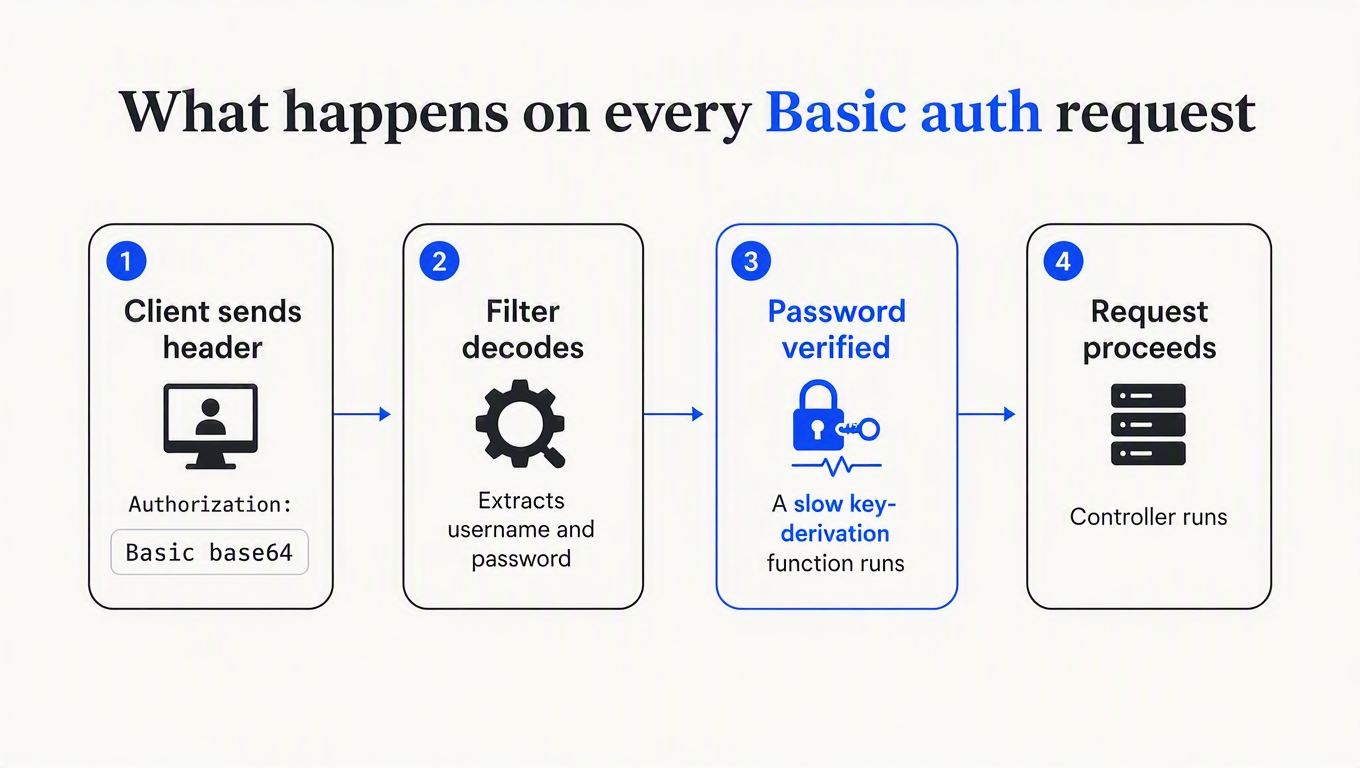
Step three is the one with a bill attached, and going stateless is what puts it on every request.
BasicAuthenticationFilter only skips re-authentication when the SecurityContext already holds an authenticated principal with the same username. On a stateless chain the context is not carried between requests, so that check finds nothing every time and the password gets verified from scratch. Verified, here, means running a deliberately slow key-derivation function.
How slow? I measured it rather than guessing. Same application, same route, same payload, three stored password formats, 30 requests each after warm-up, over loopback on an arm64 laptop:
| Stored password format | Median per request | Fastest |
|---|---|---|
| Unauthenticated route (baseline) | 0.4 ms | 0.3 ms |
{bcrypt} strength 10 (the default) | 56.1 ms | 53.8 ms |
{bcrypt} strength 12 | 208.1 ms | 205.6 ms |
{noop} (never ship this) | 53.2 ms | 51.7 ms |
Read the first two rows together. Authentication is roughly 140 times the cost of serving the route it protects. Bump the bcrypt strength by two, as plenty of hardening guides tell you to, and one request occupies a core for a fifth of a second. At 100 requests per second you would need about 20 cores doing nothing but hashing the same password over and over.
The last row is the one that surprised me. {noop} does no hashing at all, so it should have been instant. It wasn't, and the reason is a genuinely good feature firing at a bad time. DaoAuthenticationProvider asks the encoder whether the stored format is out of date, and DelegatingPasswordEncoder says yes for anything that is not its default id. So on every successful login it re-encodes the presented password with bcrypt to upgrade the stored one. InMemoryUserDetailsManager implements UserDetailsPasswordService, so the upgrade path is live, and you pay a full bcrypt encode per request for a password that is stored in plaintext. Oof.
That is the trap in miniature: with basic authentication your only two options are a slow hash on every request, or a fast comparison against a password you should not be storing that way. There is no third setting, because basic auth asks you to verify a low-entropy human secret at machine-client request rates, and password hashing is designed to make exactly that expensive. The slowness is not a bug you can tune away. It is the entire point of the algorithm, applied to the wrong problem.
When basic auth is genuinely the right answer
Having just spent a table beating on it, let me be fair, because the honest answer is not "never."
Basic authentication is a good fit for an internal admin endpoint behind a VPN, a scrape target for Prometheus, a staging environment you want to keep out of search results, a health or metrics route hit once a minute, and any service-to-service call where the traffic is low and the operational simplicity is worth more than the microseconds. It is in every HTTP client ever written, needs no library, no token endpoint, and no refresh logic. For a request every few seconds, 56 ms of hashing is genuinely irrelevant.
The deciding factor is request rate and blast radius, not taste. If the credential is checked rarely and shared by one trusted caller, basic auth is fine, and reaching for something heavier is overengineering with extra YAML.
Where it breaks for machine-to-machine
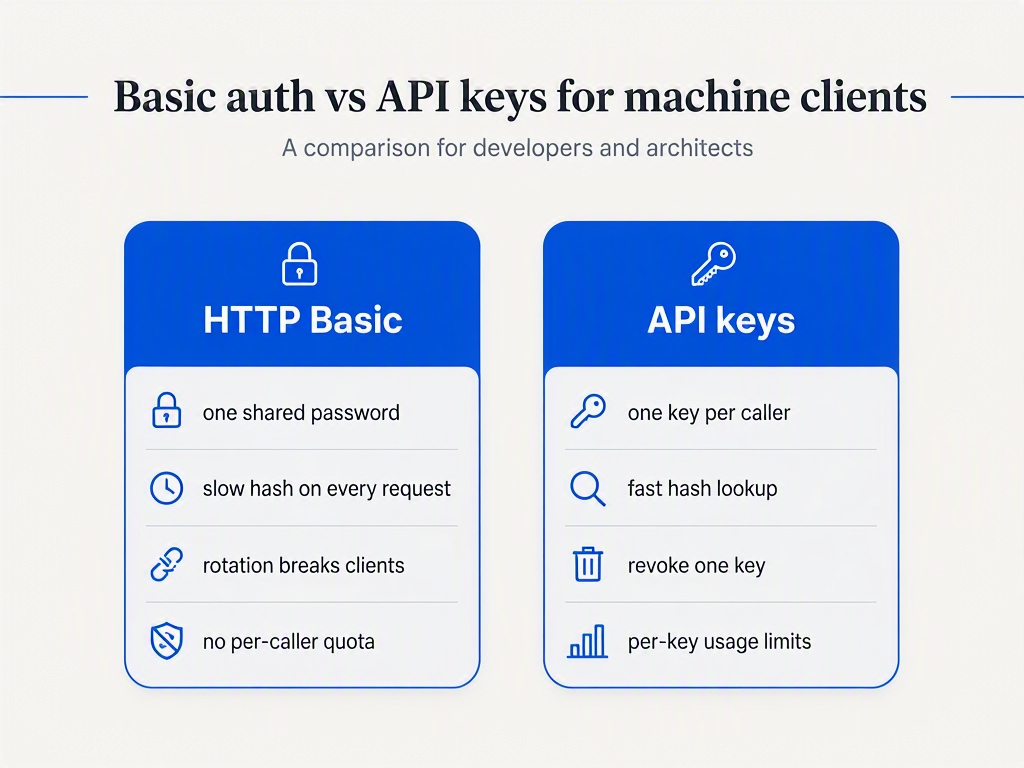
Latency is the symptom people notice first. It is not the reason to switch. These are:
You cannot tell callers apart. One username and password gets shared across every integration that needs access, then pasted into a runbook, then into a CI variable, then into a Slack thread. When traffic spikes at 3 AM you know the credential that did it, not who. Ask me how I know.
Rotation is an outage. There is one password. Changing it breaks every client simultaneously, so it never gets changed, so the password from two employees ago still works. Real rotation needs two credentials valid at once, which basic auth has no concept of. That mechanic is the whole subject of API key rotation without downtime.
You cannot revoke one caller. Cutting off a single misbehaving integration means changing the shared password and breaking the other nine.
There is nowhere to hang a quota. Per-caller rate limits, credits, and usage analytics all need a per-caller identity. A shared password gives you one bucket for everyone, and a limiter keyed on IP instead is a different problem with its own failure modes, covered in why you should rate limit by API key, not IP.
What to use instead
An API key fixes all four, and the performance problem dissolves as a side effect. The reason is worth understanding rather than copying.
A password is low-entropy, human-chosen, and reused across sites, so it has to be protected against offline brute force with a deliberately slow KDF. An API key is high-entropy randomness your system generated. There is no dictionary to attack and nothing to reuse, so a fast hash is the correct choice, not a compromise. Store SHA-256 (or HMAC-SHA256 with a pepper) of the key, keep an indexed plaintext prefix so you can find the row without the secret, and compare digests with MessageDigest.isEqual rather than String.equals, which short-circuits on the first differing byte.
Do not reach for bcrypt here out of habit. It embeds a fresh random salt per call, so the same key hashes differently every time and no index can be queried, which turns every lookup into a full table scan. The full argument, with measurements, is in how to hash API keys. If you want the Spring-specific implementation, including the filter registration trap that makes your auth filter run in the wrong place, that is Spring Boot API key authentication and the filter bean trap. And when your 401s start arriving with no explanation, Fixing "Full authentication is required to access this resource" covers the seven causes.
Picking between the options
| Mechanism | Setup effort | Per-request cost | Revoke one caller? | Main limitation |
|---|---|---|---|---|
| HTTP Basic | One bean, minutes | A full password hash | No | Shared identity, rotation breaks every client at once |
| API keys (self-built) | A filter plus a table, a day or two | One indexed hash lookup | Yes | You own rotation, quotas, and analytics forever |
| OAuth2 client credentials | Authorization server, days | Signature check, no DB hit | Only at token expiry, unless you add introspection | Heavy for first-party service calls; clients need refresh logic |
| mTLS | Certificate infrastructure, weeks | Handshake, then amortised | Yes, via CRL or short-lived certs | Certificate lifecycle is its own operational burden |
For a public or partner-facing API, keys are usually the right rung on that ladder. For internal service meshes where you already have certificate infrastructure, mTLS is hard to beat.
Worth 50 minutes if you want the model, not the recipe
If the filter chain still feels like magic, this is the talk that fixes that. Daniel Garnier-Moiroux walks through Spring Security's architecture from the servlet filter up, which makes every configuration decision above stop being arbitrary.
Key takeaways
- The no-arg
httpBasic()no longer compiles. Spring Security 7 keeps only theCustomizeroverload, andWebSecurityConfigurerAdapteris removed outright. If a tutorial shows either, it predates the version you are running. UsehttpBasic(withDefaults()). - Stateless basic auth pays a password hash on every request. Measured at 56 ms per call with default bcrypt strength 10, against 0.4 ms for the unprotected route. Budget for it before you put basic auth on a hot path.
- Lowering the hash cost is not the fix. A
{noop}password still cost 53 ms, because the delegating encoder upgrades the stored format on every successful login. Change the credential type, not the strength. - Basic auth is fine for low-rate internal endpoints and wrong for anything with more than one caller. The test is not how secure it feels, it is whether you need to identify, rotate, revoke, or meter per caller.
- API keys get a fast hash precisely because they are high-entropy. SHA-256 or HMAC with an indexed prefix is correct, not a shortcut. bcrypt cannot be indexed at all.
If you would rather not build the key layer
Everything in the last two sections is a week of work done properly: hashing and lookup, prefixes, rotation with an overlap window, per-consumer revocation, quotas, and the usage data to see any of it. That is what ReqKey does, and the Spring path is a starter plus properties rather than a filter you maintain. It registers through a FilterRegistrationBean with an explicit order and URL patterns, which is what keeps it clear of the double-registration trap that catches hand-rolled filter beans, and it maps denials to real statuses: 401 for a missing or invalid key, 402 for exhausted credits, 403 for access denied, 429 with a Retry-After header when rate limited.
The Java SDK and Spring Boot starter are on Maven Central, and the free tier is 100,000 requests a month with 1,000 keys, which is more than enough to put a real key layer in front of a staging API and compare it against the 56 ms you are paying now.