Failed requests due to blocks: why your API calls get rejected
A block isn't an error your API produced, it's another layer answering on its behalf. How to tell a WAF rule from a rate limit from a disabled key, using only what comes back in the response.

Sorower
Co-founder
In this article
- The status code is a configuration choice, not a diagnosis
- First fork: did the request ever leave the browser?
- Why API requests get blocked: five gates, in order
- Read the response, not the number
- Reproduce it, then change exactly one thing
- Why your WAF log looks empty when it clearly isn't
- Key-state blocks should never be a guess
- Log four fields and next time takes thirty seconds
- Key takeaways
An honest way to open a piece about blocked requests: while researching this one, the AWS support article titled "Troubleshoot AWS WAF 403 Forbidden error" answered an automated fetch with a 403. A few minutes later, a YouTube page returned Google's "unusual traffic from your computer network" interstitial instead of the video. Two blocks, two different layers, and neither response said a word about which rule fired.
That is the entire problem with failed requests due to blocks, and it is what makes why API requests get blocked such an irritating question to answer. A block is not an error your API produced. It is a different piece of software answering on your API's behalf, with less information than your API would have given you, and there are about half a dozen layers capable of doing it.
This is a triage guide. Not "here are the common HTTP status codes" (you know those), but: given a failing request and access to your own logs, how do you work out which layer rejected it, in the right order, without changing five things at once?
The status code is a configuration choice, not a diagnosis
Start here, because most triage advice quietly assumes the opposite.
Cloudflare's rate limiting rules return 429 by default. But the docs on rate limiting rule parameters are explicit about the response code: "The default value is 429 (Too many requests)" and "You must enter a value between 400 and 499." Any value. Somebody's rate limiter is returning 403 right now because a security team decided 429 told attackers too much.
AWS goes the other way. Per the AWS WAF docs on custom responses for Block actions, when nothing else is configured "the protected resource responds to the client with the AWS WAF default Block response 403 (Forbidden)." Configure a custom response, though, and you pick the code. The example JSON in that very page returns 404 for a geo-match block. A WAF block arriving as a 404 is not a bug, it is a documented feature.
So: the number in the status line tells you what the operator chose to disclose, not what happened. A 403 might be a WAF signature, a bot rule, a rate limiter in disguise, a revoked key, or your own authorization code. Treat it as one weak signal among several, and go looking for the strong ones.
First fork: did the request ever leave the browser?
If the complaint arrived from a frontend, resolve this before anything else, because half the "blocked API" reports in existence never reach a server at all.
Two browser-side blocks dominate:
- An extension killed it. Content blockers match outgoing URLs against filter lists, and anything with
/api/metrics,/track, oranalyticsin the path is a plausible casualty. Chrome reportsERR_BLOCKED_BY_CLIENTand there is no response, no status, nothing in your server logs. Your API is innocent and also completely unaware. - CORS. This one is genuinely confusing because the request usually succeeded. The browser sent it, your server processed it, your database wrote the row, and then the browser refused to let JavaScript read the reply because the response headers didn't permit it. Your access log shows a cheerful 200 for a request the user is convinced was blocked.
The test takes ten seconds: replay the same request from curl, outside the browser. Works from curl, fails in the browser? It is the browser, and your server logs are evidence of success rather than failure. Fails identically from curl? Good, now you have a real block, and the rest of this guide applies.
Why API requests get blocked: five gates, in order
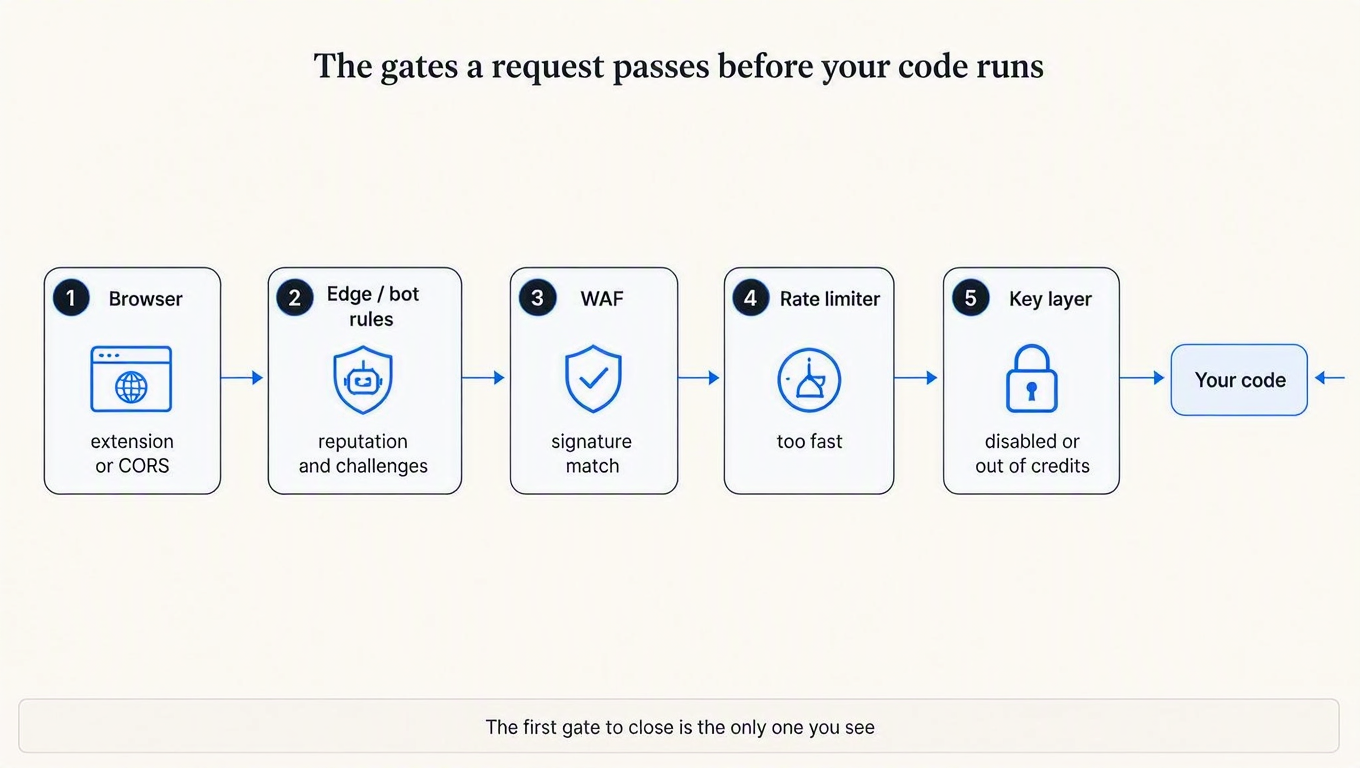
Every request runs a gauntlet, and each gate can terminate it. Cloudflare documents this shape openly: its security features run in a fixed sequence of phases, custom rules evaluate before rate limiting rules, and a terminating action stops the request from reaching later phases entirely.
Which produces the single most useful mental model in this whole article:
The block you can see is the first gate that closed, not the only gate that would have.
This is why fixing a block sometimes feels like whack-a-mole. You add a WAF exclusion, the 403 disappears, and a 429 shows up in its place, because the rate limiter was always going to reject that traffic and never got the chance to. Nothing regressed. You just moved one gate further down the corridor.
The gates, in the order they typically run:
- The client itself (extension, CORS, corporate proxy)
- Edge reputation and bot rules (IP reputation, ASN rules, geo, managed challenges)
- The WAF (signature and anomaly-score rules against your payload)
- The rate limiter (too many, too fast)
- Your key or auth layer (unknown, disabled, expired, out of credits)
Then, finally, your application's own authorization logic, which is the only one of the six that knows what the request was actually trying to do.
Read the response, not the number
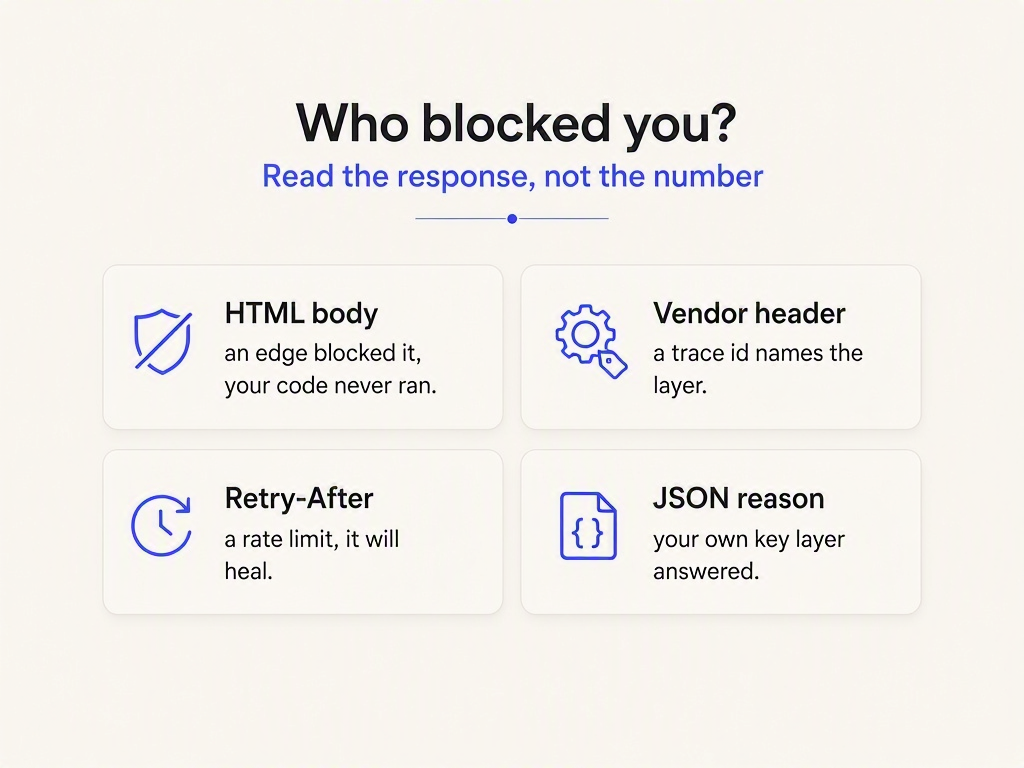
Here is the fastest single signal, and it costs nothing to check: what content type came back?
Your API returns JSON. It has returned JSON for every request of its life. If a JSON endpoint hands you text/html, your application code never ran. Something in front of it generated a human-facing page for a machine that has no eyes. That one check separates gates 2 and 3 from gates 5 and 6 before you open a single dashboard.
Dump the whole response and look at it properly:
curl -sS -X POST https://api.example.com/v1/things \
  -H 'Authorization: Bearer sk_live_xxx' \
  -H 'Content-Type: application/json' \
  -d '{"name":"test"}' \
  -D /tmp/headers.txt -o /tmp/body.txt \
  -w 'status=%{http_code}  type=%{content_type}  bytes=%{size_download}\n'
A block from an edge in front of your API has a shape like this:
status=403 type=text/html; charset=UTF-8 bytes=8127HTML, eight kilobytes, for a JSON POST. Your service did not write that. Now read the headers for a signature:
grep -iE '^(server|cf-ray|cf-mitigated|retry-after|x-amzn|x-ratelimit)' /tmp/headers.txtTwo headers are worth knowing by heart. cf-ray is the Cloudflare Ray ID, the identifier attached to every request through their network, and it is the join key into Security Events when you need to find out which rule fired. And cf-mitigated means you were challenged rather than rejected: Cloudflare's docs on detecting a challenge page response state that "challenge is the only valid value" for that header. If you see it, no rule decided you were malicious. A rule decided you might be a browser, and you failed to be one.
The full fingerprint table:
| Who blocked it | Typical status | Body | Telltale | Pattern |
|---|---|---|---|---|
| Browser extension | none | none | ERR_BLOCKED_BY_CLIENT in console, nothing server-side | Same URL pattern, every time |
| CORS | unreadable | unreadable | Console CORS error, 200 in your access log | Browser only, never curl |
| Bot rule / challenge | 403 | HTML | cf-mitigated: challenge | Follows the client, not the payload |
| WAF signature | 403 (or whatever's configured) | HTML, often with a trace id | cf-ray, Ray ID on the page, vendor server header | Follows the payload |
| Rate limiter | 429 (or whatever's configured) | HTML at the edge, JSON in-app | Retry-After, X-RateLimit-* | Intermittent, correlates with volume, self-heals |
| Key layer | 401 / 402 / 403 | JSON | A machine-readable reason code | Follows the key, perfectly consistent |
| Your app | 403 / 404 | Your own JSON error shape | Your correlation id, a stack trace somewhere | Follows the resource |
Codify the top of that table and your client can stop guessing:
type Verdict = {
  layer: "edge" | "your-api" | "unknown";
  transient: boolean;          // will backing off actually help?
  retryAfterMs: number | null;
};

export function classifyBlock(res: Response): Verdict {
  const contentType = res.headers.get("content-type") ?? "";
  const retryAfter = res.headers.get("retry-after");

  // Cloudflare sets this on any challenge response, and "challenge"
  // is the only value it ever takes.
  const challenged = res.headers.get("cf-mitigated") === "challenge";

  // An empty body tells you nothing. Don't pretend otherwise.
  if (!contentType && !challenged) {
    return { layer: "unknown", transient: false, retryAfterMs: null };
  }

  // A JSON API that answers in HTML did not answer at all.
  const layer = challenged || !contentType.includes("json")
    ? "edge"
    : "your-api";

  return {
    layer,
    transient: res.status === 429 || retryAfter !== null,
    retryAfterMs: retryAfter ? parseRetryAfter(retryAfter) : null,
  };
}

function parseRetryAfter(value: string): number | null {
  const seconds = Number(value);
  if (Number.isFinite(seconds)) return Math.max(0, seconds * 1000);

  // Retry-After is also allowed to be an HTTP-date, which is how
  // most naive parseInt() implementations quietly return NaN.
  const at = Date.parse(value);
  return Number.isNaN(at) ? null : Math.max(0, at - Date.now());
}
That parseRetryAfter fallback is not padding. RFC 9110 allows Retry-After to be either delta-seconds or an HTTP-date, and a client that does parseInt(header) on the date form gets NaN, falls through to a default, and hammers the endpoint it was just asked to leave alone. We wrote a whole post on how badly that header gets handled in your 429 response is probably wrong.
Reproduce it, then change exactly one thing
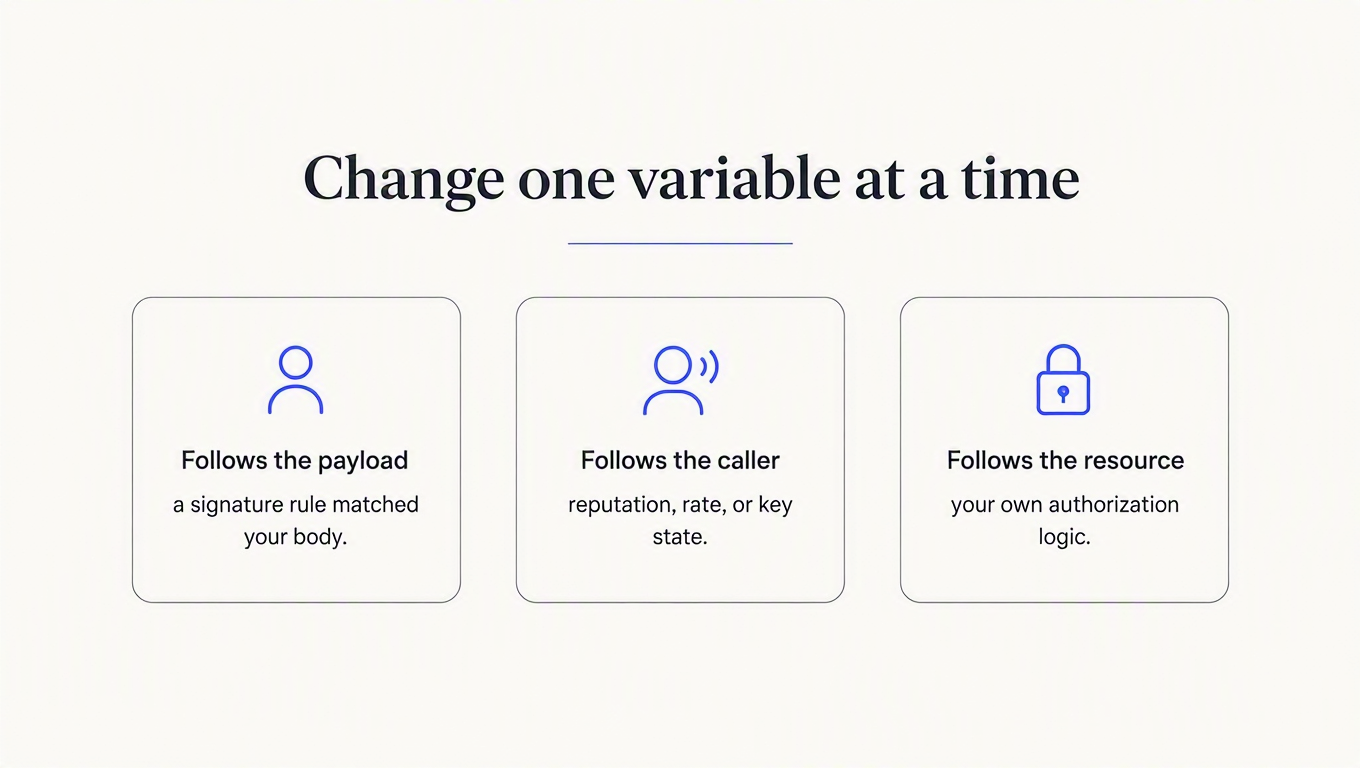
Once you can reproduce a block on demand, the diagnosis is a controlled experiment. Change one variable, keep everything else identical, and record what happens.
| Change this | Block disappears | Block persists |
|---|---|---|
The request body (send {"name":"a"}) | WAF signature matched your payload | Not content-based |
| The API key (use a second, healthy key) | Key state: disabled, expired, out of credits, wrong API | Not key-specific |
| The source IP (phone hotspot, different region) | IP reputation, geo rule, or an address-keyed rate limit | Not network-based |
| The client (curl instead of your SDK) | A header your SDK sends, or one it fails to send | Not client-shaped |
| Wait five minutes, retry once | Rate limit or a temporary reputation penalty | A static rule; waiting will not save you |
| The resource id (a record you definitely own) | Your own authorization logic | Nothing reached your authorization logic |
The compressed version, worth taping to a wall: a block that follows the payload is a signature rule, a block that follows the caller is reputation, rate, or key state, and a block that follows the resource is your own code. Three questions, and you have usually halved the search space before opening a dashboard.
One caution on the "wait five minutes" row, because it can mislead you in both directions. Cloudflare's rate limiting rules take a mitigation_timeout: "once the rate is reached, the rate limiting rule applies the rule action to further requests for the period of time defined in this field", and the allowed values run all the way up to 86400, a full day. A rule configured that way keeps rejecting you long after your traffic went quiet, which looks exactly like a static block and is not one. Five minutes of patience is a useful probe; five minutes of patience is not proof.
Why your WAF log looks empty when it clearly isn't
You have narrowed it to the WAF. You open the logs, filter for blocked requests, and find one useless row. This is not your fault, and the explanation is documented in one of the better troubleshooting articles any cloud vendor has published: Microsoft's guide to WAF blocking legitimate requests in Application Gateway.
In OWASP Core Rule Set anomaly-scoring mode, individual rules do not block. They add to a score. When the score crosses the threshold, a single aggregator rule does the blocking. Per Microsoft, "the only action_s == 'Blocked' row is the aggregator rule 949110", its data field "is empty", and "it carries no field to exclude." The rules that actually matched your request are logged with the action Matched, not Blocked.
So the standard instinct, filter for blocks, guarantees you find the one row that cannot tell you anything. Query for Matched rows at the same timestamp and the real culprits appear. Three families cover most false positives:
942xxx(SQLi). Common false positives on "sign-in forms, search fields, or query parameters containing SQL-like syntax." A user whose password contains an apostrophe can trip rule942430.941xxx(XSS). False positives on "JSON payloads, rich text, or HTML content in request bodies." Adescriptionfield containing HTML triggers941100. Your rich-text editor is, to a signature engine, an attack.920xxx(protocol enforcement). This is the one that explains the symptom every API team eventually hits.
That last family deserves its own paragraph, because it answers "it works in my browser but fails from my server" more precisely than anything else I found. Microsoft's guidance: "nonbrowser clients (such as cURL, PowerShell Invoke-WebRequest, and API testing tools) can trigger protocol enforcement rules in the 920xxx range (for example, rule 920300 for a missing Accept header) that contribute to the anomaly score alongside the primary rule match." And separately, rule 920350 "triggers when the Host header contains an IP address instead of a hostname."
Read that twice if you run service-to-service calls. Your backend doesn't send an Accept header because it doesn't care. It calls an internal address by IP because DNS is one more thing to break. Both of those are, individually, small anomaly-score contributions from a client that is behaving perfectly reasonably, and together they can push an ordinary request over a threshold that a browser sending the same payload never approaches.
Two more things from that guide worth stealing. Classic payloads trip several overlapping rules at once, so excluding one rule id and seeing the block persist does not mean the exclusion failed. And there is a clean binary search available: switch the WAF to detection mode, and if the 403s continue, they were never coming from the WAF. That is a five-minute experiment that settles an argument which otherwise runs for a day.
AWS's own walkthrough of the equivalent workflow is a decent seven minutes if you'd rather watch than read:

Key-state blocks should never be a guess
Gate five is the one you control completely, and it is the one most teams leave ambiguous. "Your API key was rejected" is not a diagnosis. Rejected because it doesn't exist? Because it was revoked last Tuesday? Because the account ran out of credits? Because it's fine but calling an API it isn't allowed to touch? Those are four different support tickets and four different fixes, and an {"error": "unauthorized"} covers all of them equally badly.
This is the failure mode a key layer exists to remove, so it is worth showing what unambiguous looks like. ReqKey's documented status table gives each cause its own answer from POST /key/validate:
| Status | Means | Caller should |
|---|---|---|
200 with {"valid": false} | Key not found | Check the credential, stop retrying |
402 | The consumer's credit limit is exceeded | Top up or wait for refill |
403 | Disabled key, disabled consumer, or API not allowed | Contact the account owner |
429 with {"rateLimited": true} | Consumer rate limit | Back off, read Retry-After |
401 | Your root key is wrong | Fix your own server config, not the caller's |
Note the first row, because it catches people: an unknown key comes back 200 with valid: false. Branch on the field, not the status. That is a deliberate design decision (validation succeeded; the answer was no) and it will silently break any client that only checks res.ok.
const res = await fetch("https://api.reqkey.com/key/validate", {
  method: "POST",
  headers: {
    Authorization: `Bearer ${process.env.REQKEY_ROOT_KEY}`,
    "Content-Type": "application/json",
  },
  body: JSON.stringify({ key: callerKey, credits: 1 }),
});

const body = await res.json();

switch (res.status) {
  case 200:
    // Unknown key is a 200. Read the field, not the status line.
    if (!body.valid) return deny(401, "invalid_key", body.message);
    return allow(body.requestId, body.creditsRemaining);

  case 402:
    return deny(402, "out_of_credits", "Credit limit exceeded");

  case 403:
    // "Key is disabled", "Consumer is disabled", or no access to this API.
    return deny(403, "key_blocked", body.message);

  case 429:
    return deny(429, "rate_limited", "Slow down", {
      retryAfter: res.headers.get("retry-after"),
      limit: res.headers.get("x-ratelimit-limit"),
      window: res.headers.get("x-ratelimit-window"),
    });

  default:
    // 401 means your root key is wrong; 5xx is safe to retry with backoff.
    throw new Error(`validate failed: ${res.status}`);
}
Three properties of that design are worth borrowing whether or not you use ReqKey.
First, the gates run in a documented order, and the credit check is last: key exists, key belongs to this project, key active, consumer active, key not expired, API allowed, then credits. Which means a revoked or expired key is rejected before anything is deducted. Free by construction rather than by refund policy, and the reason the error you get is the first real problem rather than a downstream symptom of it. Same principle as the WAF phases, one layer down.
Second, a rate-limited request "consumes no credits and no rate-limit quota." A throttled client recovers the moment it slows down, instead of digging itself deeper with every retry. That difference matters most for the customers who are least able to debug it.
Third, and this is the honest limitation: rate limits are set per consumer, not per key. A guessed key belongs to no consumer, so it gets no bucket at all. A managed key layer will tell you precisely why a real key was blocked, and it will not stop someone spraying fake ones at you. That coarse gate in front of authentication stays your job, which is a whole post of its own: rate limiting failed authentication.
Log four fields and next time takes thirty seconds
Everything above is recoverable archaeology. It is much cheaper to leave yourself evidence. For every non-2xx response your client receives from an upstream, log four things:
- The status code. Obvious, and insufficient on its own, as established.
- The response content type. The single field that separates "an edge answered" from "our API answered", and almost nobody logs it.
- The vendor trace id.
cf-ray,x-amzn-requestid, whatever your edge emits. Without it you cannot find the request in the security dashboard, and sampled logs age out fast. - Your own correlation id. So the failing client call and the server-side record are the same row in two systems.
The last one is why ReqKey's /key/validate returns a requestId that is a required field on /ingest: it makes what was charged and what was actually served joinable on one column. Reconciling those two sets is how you find requests that were billed but never delivered, which we dug into in your credit system bills before it knows the request worked.
Log those four and the next incident starts with a query instead of a reproduction.
Key takeaways
- Never diagnose from the status code alone. Cloudflare lets a rate limiting rule return any code from 400 to 499, and AWS WAF lets a block return any supported code. The number is a disclosure policy, not a cause.
- Check the content type first. A JSON API that replies in HTML did not reply. Your code never ran, and everything you were about to check in your application is a waste of time.
- The block you see is the first gate that closed. Rules run in fixed phases and terminate early, so fixing one block can reveal the next. That is not a regression, it is the corridor.
- Filter WAF logs for
Matched, notBlocked. In anomaly-scoring mode the only blocked row is an aggregator with no detail. The rules that actually matched your request are logged under a different action. - Give every rejection reason its own answer. Unknown key, revoked key, out of credits, and too fast are four different problems. If your API returns the same 403 for all four, every one of them becomes a support ticket.
If gate five is the ambiguous one in your stack, that is the fixable one. ReqKey answers each key-state rejection distinctly, hands back the rate-limit headers a client needs to behave, and logs the validation and the served request against a shared id so you can reconcile them later. The free plan is $0/mo and includes 100,000 requests every month, which is enough to point a staging environment at it and find out what your current 403s were actually hiding. The docs have the full status table if you only want to compare it against your own.