Fixing "Full authentication is required to access this resource" in Spring Boot
The message never means your API key was rejected. It means nothing read it. Seven causes reproduced on one Spring Boot app, each with the curl that triggers it.

Sorower
Co-founder
In this article
- What "Full authentication is required to access this resource" actually is
- The message is a decoder ring, so read it literally
- Why you might not see the message at all
- The rig
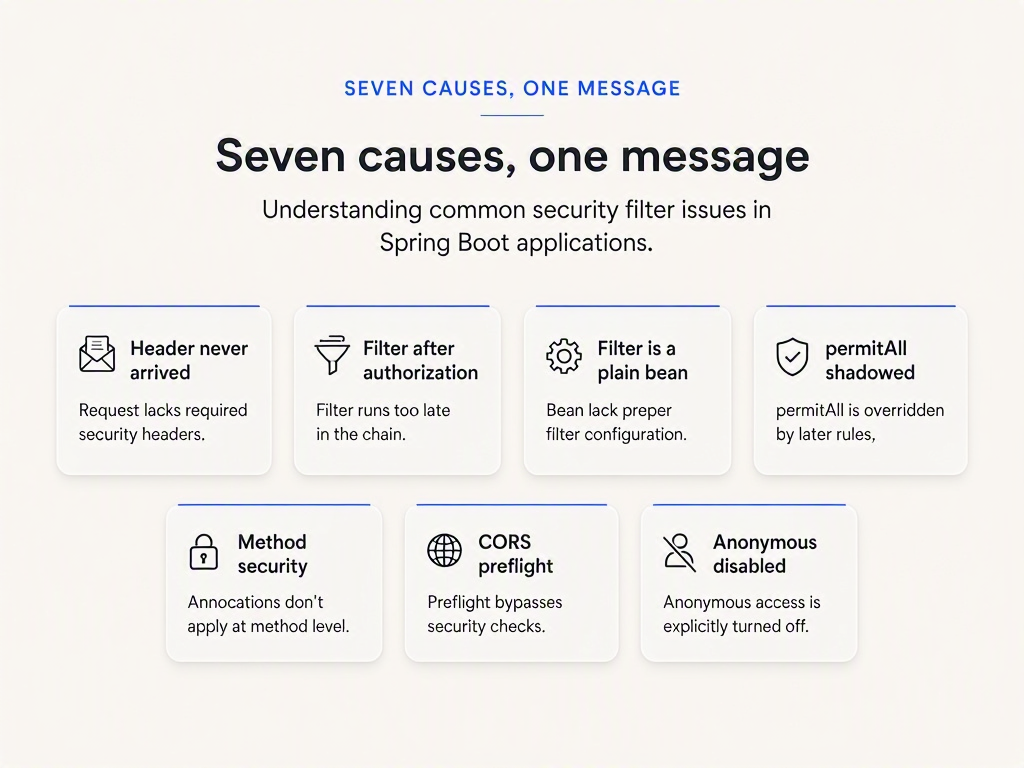
- Cause 1: the header never arrived in the shape you think
- Cause 2: your filter runs after the authorization check
- Cause 3: your filter is a plain @Bean, so it only runs where it isn't needed
- Cause 4: permitAll is in the wrong place
- Cause 5: the URL is public, the method is not
- Cause 6: it's the CORS preflight, not your endpoint
- Cause 7: anonymous auth is disabled, and the message changes
- Triage, in about a minute
- Where this stops being a Spring problem
- Worth 40 minutes if you want the model, not the fix
- Key takeaways
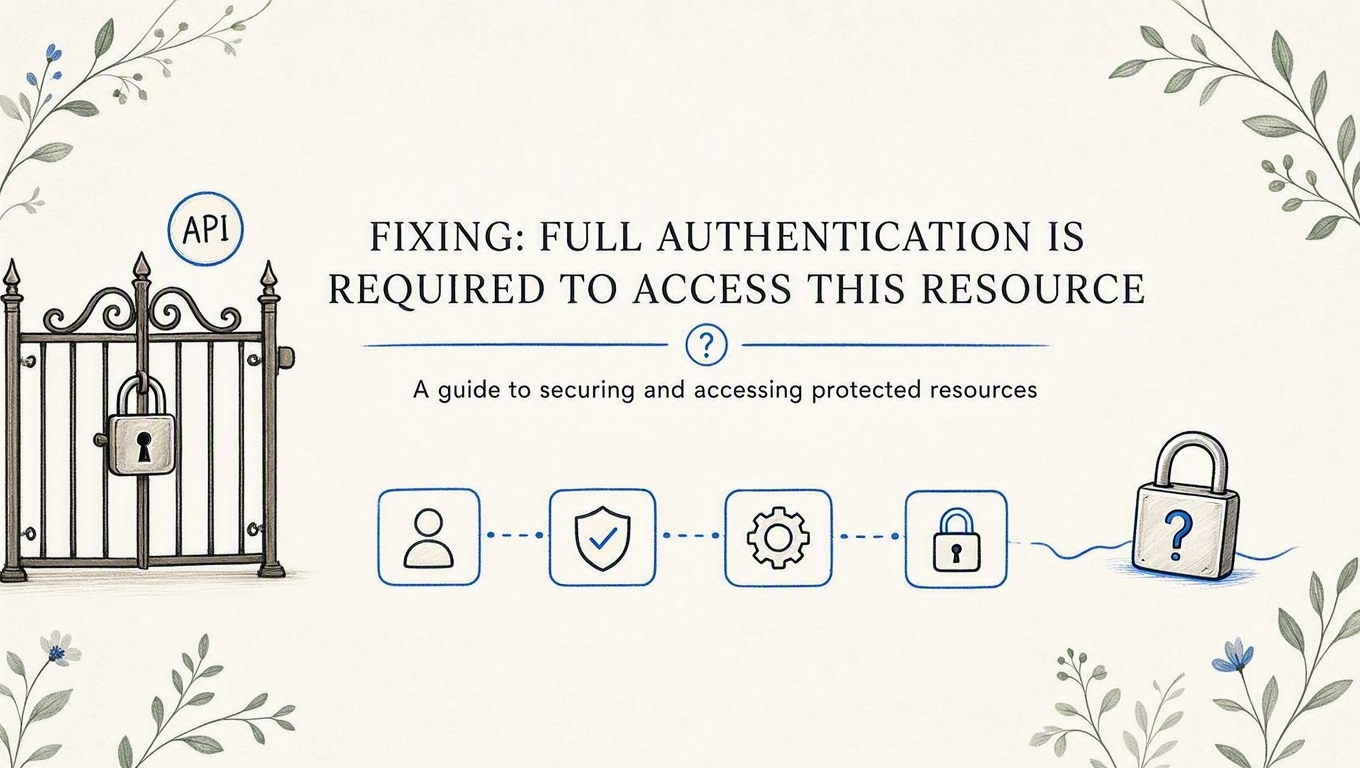
The message is a lie of omission. "Full authentication is required to access this resource" reads like Spring Security examined your API key and didn't like it. It means very nearly the opposite: by the time anything made a decision, there was no credential in play at all. Nothing rejected your key. Nothing read your key.
That distinction is the entire debugging strategy, and it is why the usual advice ("add permitAll()", "check your token") solves the problem maybe a third of the time. This post traces the string back to the exact line of Spring Security that emits it, then reproduces seven different ways to trigger it on one running app, each with the curl that provokes it and the output it returns.
Everything below was run against Spring Boot 3.5.16 (which resolves Spring Security 6.5.11) on JDK 21. Spring Boot 4.1.0 and Spring Security 7.1.0 are the current releases, and the message we're chasing is unchanged on Spring Security's main branch, so the diagnosis holds on both lines.
What "Full authentication is required to access this resource" actually is
It is not a sentence someone wrote for your situation. It is a resource bundle key, shipped inside spring-security-core:
unzip -p ~/.m2/repository/org/springframework/security/spring-security-core/6.5.11/spring-security-core-6.5.11.jar \
  org/springframework/security/messages.properties | grep insufficientAuthentication
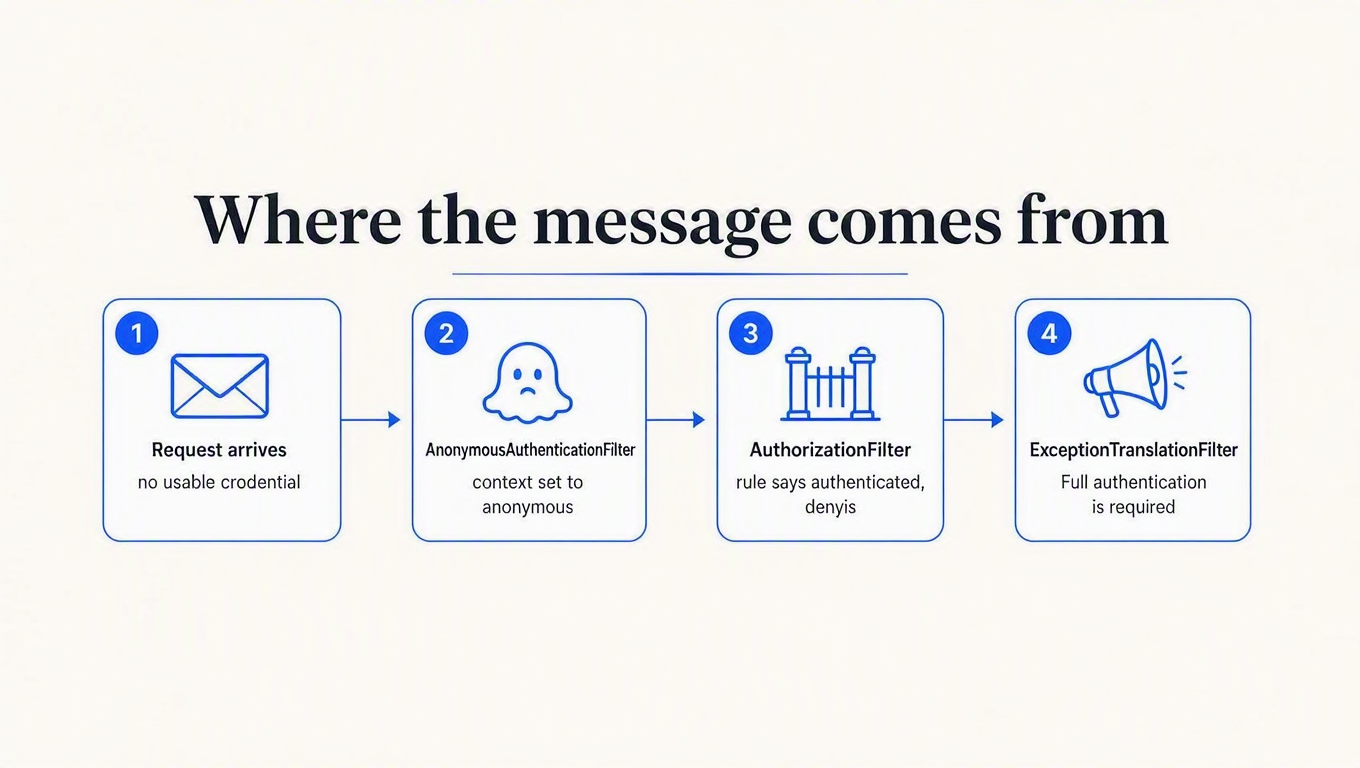
ExceptionTranslationFilter.insufficientAuthentication=Full authentication is required to access this resourceThe key name tells you everything the message doesn't. Exactly one class emits it, ExceptionTranslationFilter, on exactly one branch: a request was denied, and the Authentication sitting in the SecurityContext at that moment was the anonymous one. Spring Security's own architecture reference lays out the chain this runs in.
So the message encodes two facts, and neither of them is about your credential:
- An authorization rule said no. Some matcher resolved to
authenticated()(or a role check) for this request. - The security context was anonymous when that happened. Not wrong, not expired. Anonymous, which is the state Spring puts you in when no authentication filter claimed the request.
The message is a decoder ring, so read it literally
Spring Security has a different string for every failure mode, and people skip past that. These are the exception messages, which you'll see in a DEBUG log, or in a response body if your entry point or access-denied handler echoes them. Here is what each one actually rules out:
| Message you got | What it means | What it rules out |
|---|---|---|
Full authentication is required to access this resource |
Context was anonymous when a rule denied the request | Your credential was never evaluated. Stop debugging the key. |
An Authentication object was not found in the SecurityContext |
Context was null, not anonymous. You disabled anonymous auth. | Same as above, plus: AnonymousAuthenticationFilter is off. |
Access is denied |
You are authenticated; the authority check failed | The credential worked. This is a roles problem, not an auth problem. |
Bad credentials |
A credential was read and rejected | Filter placement. Something clearly ran. |
Bearer token is malformed |
The header was present but didn't match the bearer grammar | A missing header. The header arrived, in the wrong shape. |
If you are reading the first row, every minute you spend regenerating tokens is a minute wasted. That is the single most useful thing this string tells you, and no page on the first result page for this error says it.
Why you might not see the message at all
Here's a wrinkle that sends people in circles: whether that string ever reaches your response body depends on your AuthenticationEntryPoint, not on the failure. Three configurations, same anonymous request to the same protected route:
| Chain configuration | Status | Body |
|---|---|---|
| Custom filter only, no auth mechanism configured | 403 | empty |
.httpBasic() (Boot's default when Security is on the classpath) | 401 + WWW-Authenticate: Basic | empty |
Custom entry point echoing ex.getMessage() | 401 | the message |
That first row surprises people: with no authentication mechanism registered, HttpSecurity falls back to a 403 entry point, so an unauthenticated request to a chain built purely from a custom filter answers 403, not 401. Same root cause, different status, and now your client's refresh-on-401 logic never fires.
The second row is why so many searches for this string start in a log file rather than a response. BasicAuthenticationEntryPoint sends the HTTP reason phrase, not the exception message, and Spring Boot blanks message in error bodies by default anyway. Setting server.error.include-message=always did not help on its own, because the sendError call re-dispatches to /error, and /error was itself behind anyRequest().authenticated(). Permit it and the body renders:
$ curl -s http://localhost:8099/api/reports
{"timestamp":"...","status":401,"error":"Unauthorized","path":"/api/reports"}
The third row is the one most readers have, because it is what nearly every Spring JWT tutorial ships: an entry point that serialises authException.getMessage() into JSON. That's where the googled string comes from. It's also the configuration used for every repro below, so the cause is visible in the response:
public class ApiAuthEntryPoint implements AuthenticationEntryPoint {
  @Override
  public void commence(HttpServletRequest req, HttpServletResponse res,
                       AuthenticationException ex) throws IOException {
    res.setStatus(401);
    res.setContentType("application/json");
    res.getWriter().write("{\"status\":401,\"error\":\"Unauthorized\",\"message\":\""
        + ex.getMessage() + "\",\"path\":\"" + req.getServletPath() + "\"}");
  }
}
If you have no entry point at all, skip the guessing and turn the chain's own narration on with logging.level.org.springframework.security=DEBUG. It prints the failure and, more importantly, the filter order.
The rig
One app, one illustrative filter that reads a header and sets an Authentication, two routes: /api/reports (protected) and /api/public/ping (meant to be open).
public class ApiKeyFilter extends OncePerRequestFilter {
  @Override
  protected void doFilterInternal(HttpServletRequest req, HttpServletResponse res,
                                  FilterChain chain) throws ServletException, IOException {
    String header = req.getHeader("Authorization");
    if (header != null && header.startsWith("Bearer ")
        && header.substring(7).equals("demo_key_123")) {
      var auth = new UsernamePasswordAuthenticationToken(
          "acme-corp", null, List.of(new SimpleGrantedAuthority("ROLE_CONSUMER")));
      SecurityContextHolder.getContext().setAuthentication(auth);
      log.info("AUTH SET for {}", req.getRequestURI());
    }
    chain.doFilter(req, res);
  }
}
That log line matters. In two of the causes below it never prints, and its absence is the diagnosis.
Cause 1: the header never arrived in the shape you think
Start here because it costs ten seconds. The filter above checks startsWith("Bearer "), which is the near-universal tutorial idiom, and it is stricter than the spec:
curl -s -w " [%{http_code}]\n" -H "Authorization: Bearer demo_key_123" localhost:8099/api/reports
curl -s -w " [%{http_code}]\n" -H "Authorization: ApiKey demo_key_123" localhost:8099/api/reports
curl -s -w " [%{http_code}]\n" -H "Authorization: bearer demo_key_123" localhost:8099/api/reports
{"ok":true,"route":"/api/reports","principal":"...:acme-corp"} [200]
{"status":401,...,"message":"Full authentication is required to access this resource"} [401]
{"status":401,...,"message":"Full authentication is required to access this resource"} [401]The third one is the interesting failure. RFC 7235 defines the auth scheme as a case-insensitive token, so bearer is a perfectly legal thing for a client to send. Spring Security's own DefaultBearerTokenResolver respects that; its pattern is compiled Pattern.CASE_INSENSITIVE. Your hand-rolled startsWith is not, so a spec-compliant client gets a 401 that blames it for sending nothing.
The same output covers the boring-but-common variants: a reverse proxy that drops Authorization on the way through, an SDK that sets X-API-Key while your filter reads Authorization, a shell that swallowed the variable and sent Bearer with an empty tail. All of them look identical from inside Spring, because all of them are identical from inside Spring: no usable credential.
Cause 2: your filter runs after the authorization check
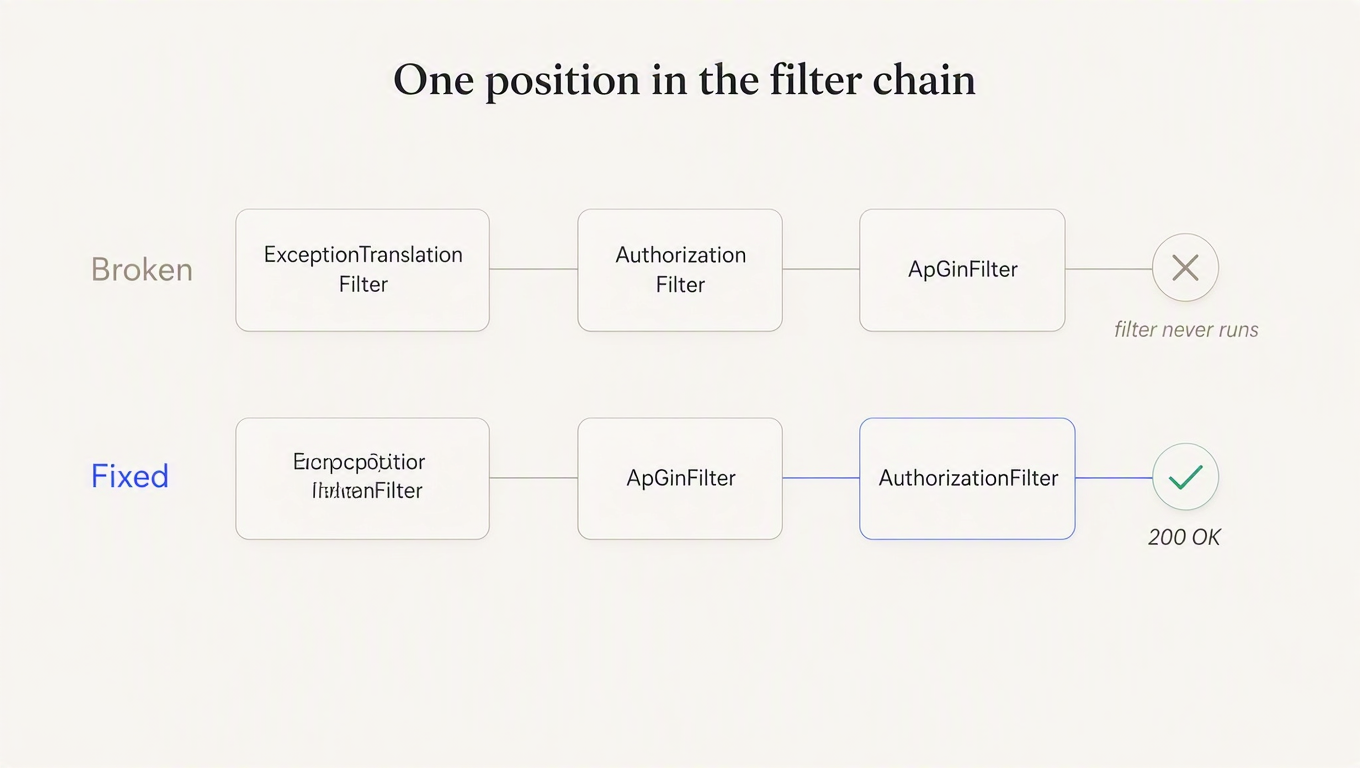
This one is cruel, because the config reads correctly and the key is valid. The only mistake is one word:
// Wrong. AuthorizationFilter has already denied the request.
.addFilterAfter(new ApiKeyFilter(), AuthorizationFilter.class)
curl -s -w " [%{http_code}]\n" -H "Authorization: Bearer demo_key_123" localhost:8099/api/reports{"status":401,...,"message":"Full authentication is required to access this resource"} [401]A valid key, and a 401. The filter's AUTH SET line appeared zero times in the log, because ExceptionTranslationFilter caught the denial and short-circuited the chain before your filter was ever reached. Silence from your own filter is the tell.
You do not have to guess at the order. Spring Security prints the whole chain at startup under DEBUG. Broken:
Will secure any request with filters: ..., AnonymousAuthenticationFilter,
ExceptionTranslationFilter, AuthorizationFilter, ApiKeyFilter
Fixed, by swapping addFilterAfter for addFilterBefore(new ApiKeyFilter(), AuthorizationFilter.class):
Will secure any request with filters: ..., AnonymousAuthenticationFilter,
ExceptionTranslationFilter, ApiKeyFilter, AuthorizationFilter
One position. AuthorizationFilter is deliberately last in the default chain, so anything you add before it is what gets to establish identity, and anything after it is decoration. The often-cited addFilterBefore(..., UsernamePasswordAuthenticationFilter.class) works for the same reason, it just lands further up than it needs to.
Cause 3: your filter is a plain @Bean, so it only runs where it isn't needed
This is the one I'd bet on if you told me nothing else about your app. Declare the filter as a @Bean and forget to add it to the chain, and Spring Boot still registers it, with the embedded servlet container, mapped to /*. It looks wired up. It compiles. It even logs.
Same valid key, two routes, one run:
curl -H "Authorization: Bearer demo_key_123" localhost:8099/api/reports      # protected
curl -H "Authorization: Bearer demo_key_123" localhost:8099/api/public/ping  # permitAll
{"status":401,...,"message":"Full authentication is required to access this resource"} [401]
{"ok":true,"route":"/api/public/ping","principal":"UsernamePasswordAuthenticationToken:acme-corp"} [200]
# filter log for the entire run:
[bean-filter] AUTH SET for /api/public/ping -> acme-corpThe filter ran exactly once, on the route that didn't need it. Spring Boot registers the security chain at SecurityProperties.DEFAULT_FILTER_ORDER, which is -100, while an ordinary Filter bean defaults to LOWEST_PRECEDENCE. Your filter is therefore queued behind the entire security chain: on a permitted route the chain lets the request through and your filter runs (and its Authentication even reaches the controller, which is why the principal shows up in that 200), and on a protected route the chain rejects the request before your filter's turn arrives.
So the fix is to put it in the chain and keep the container from registering it separately:
@Bean
FilterRegistrationBean<ApiKeyFilter> disableContainerRegistration(ApiKeyFilter filter) {
  var registration = new FilterRegistrationBean<>(filter);
  registration.setEnabled(false);   // container: no. security chain: yes.
  return registration;
}
Or skip the bean entirely and construct it inline in the chain, as the earlier examples do. The other half of this trap, where the filter is registered in both places and runs twice per request, is measured in our Spring Boot API key authentication post. It's the same root cause wearing a different symptom.
Cause 4: permitAll is in the wrong place
Rules inside authorizeHttpRequests are evaluated top to bottom and the first match wins. A broad rule above a narrow one makes the narrow one unreachable:
.authorizeHttpRequests(r -> r
    .requestMatchers("/api/**").authenticated()        // matches first...
    .requestMatchers("/api/public/**").permitAll()     // ...so this never runs
    .anyRequest().permitAll())
curl -s -w " [%{http_code}]\n" localhost:8099/api/public/ping
curl -s -w " [%{http_code}]\n" localhost:8099/health{"status":401,...,"message":"Full authentication is required to access this resource"} [401]
{"status":"UP"} [200]No warning, no startup error. Your config says the route is public and the app disagrees, silently. Order most-specific first and it behaves.
Now contrast that with the same mistake one level up, across two SecurityFilterChain beans where the first has no securityMatcher and therefore claims every request. That one does not boot:
org.springframework.security.web.UnreachableFilterChainException: A filter chain that
matches any request [...'apiChain'...] has already been configured, which means that this
filter chain [...'publicChain'...] will never get invoked. Please use
`HttpSecurity#securityMatcher` to ensure that there is only one filter chain configured
for 'any request' and that the 'any request' filter chain is published last.
Worth internalising, because it saves you a search: shadowing across chains is a startup failure; shadowing within one chain is a silent 401. If your app started, cross the multi-chain theory off the list and go read your rule order.
Cause 5: the URL is public, the method is not
Method security runs downstream of the URL rules, and it throws the same family of exception, which produces the same message on a route your config swears is open:
.authorizeHttpRequests(r -> r.anyRequest().permitAll())   // everything is public

@GetMapping("/api/admin")
@PreAuthorize("hasAuthority('ROLE_ADMIN')")               // except it isn't
Map<String, Object> admin() { ... }
no key -> {"status":401,...,"message":"Full authentication is required..."} [401]
valid key,
wrong role -> {"status":403,"error":"Forbidden","path":"/api/admin"} [403]The 401/403 split is the useful part here. Anonymous plus a denial routes through the entry point and gives you our message. Authenticated plus a denial routes through the access-denied handler instead, producing a 403 from an AccessDeniedException whose message is Access is denied. If one endpoint returns 401 to strangers and 403 to your test key, the credential is working fine and you have an authorities problem.
Cause 6: it's the CORS preflight, not your endpoint
Classic shape of this bug: works in curl, works in Postman, fails in the browser. The browser sends an OPTIONS preflight first, and a preflight by design carries no Authorization header. If CORS isn't wired into the security chain, that preflight is just an anonymous request to a protected path:
curl -s -X OPTIONS -H "Origin: https://app.example.com" \
  -H "Access-Control-Request-Method: GET" localhost:8099/api/reports
{"status":401,...,"message":"Full authentication is required to access this resource"}Baeldung has a solid write-up of this specific failure, so I won't relitigate it. What that page doesn't cover is the trap I fell into while reproducing it, which cost me twenty minutes and produces a third status code.
Adding .cors(Customizer.withDefaults()) with a CorsConfigurationSource bean in place gave me 403, not the 200 I expected. The reason is that CorsConfigurer looks the bean up by name, against a constant:
private static final String CORS_CONFIGURATION_SOURCE_BEAN_NAME = "corsConfigurationSource";My bean was called src2. Spring found no configuration for the request, so DefaultCorsProcessor rejected the preflight outright. Renaming the method to corsConfigurationSource, changing nothing else:
HTTP/1.1 200
Access-Control-Allow-Origin: https://app.example.com
Access-Control-Allow-Methods: GET,POST,OPTIONS
Access-Control-Allow-Headers: authorization
Three outcomes from one preflight, then. No .cors() gives you a 401 and this article's message. A .cors() whose source bean is misnamed gives you a 403 and no message. Both wired correctly gives you a 200. A method name is load-bearing, which is the sort of thing worth knowing before it happens to you at 2 AM.
Cause 7: anonymous auth is disabled, and the message changes
"Stateless API, why would I want an anonymous user?" is reasonable-sounding advice you'll find in plenty of JWT guides. Here's what .anonymous(a -> a.disable()) does to an unauthenticated request:
{"status":401,"error":"Unauthorized",
 "message":"An Authentication object was not found in the SecurityContext",
 "path":"/api/reports"}
Same root cause, different string, because with no AnonymousAuthenticationToken the context holds null and a different exception is thrown. Use it as a signal: if you're reading that message, you already know anonymous is off, and you can skip straight to the filter-and-rules checks below.
There's a sting in the tail. Whether you get a 401 or a 403 out of this now depends entirely on your entry point, and Spring's own default for a chain with no authentication mechanism is the 403 one. Disabling anonymous auth to "clean up" a stateless API is a good way to hand your clients a status code they don't retry on.
Triage, in about a minute
In order, because each step eliminates the ones below it:
- Read the message, not the status.
Access is deniedorBad credentialsmeans your credential was read, and none of this applies. Only the two "no authentication present" strings point here. - Did the app start? If yes, chain shadowing is ruled out.
UnreachableFilterChainExceptionis a boot failure, not a runtime 401. - Turn on
logging.level.org.springframework.security=DEBUGand read the "Will secure any request with filters:" line. If your filter appears afterAuthorizationFilter, or doesn't appear at all, you have cause 2 or cause 3 and you're done. - Check whether your filter logged anything. Silence means it never ran. A log line on the public routes only means it's a container-level bean.
- Curl the endpoint three ways: no header, correct header, and
OPTIONSwith anOrigin. If only the third fails, it's CORS. - Re-read your rule order top to bottom and check for a broad matcher above the route in question. Then check the handler method for a
@PreAuthorizethat outranks it.
Notice that regenerating the key never appears on that list. It's the first thing most people try and it cannot possibly help, because the message already told you nothing looked at the key.
Where this stops being a Spring problem
Every cause above is really the same structural issue: identity is established in one place, the decision about whether a route needs identity is made in another, and nothing checks that the two agree. Spring Security is unusually honest about this compared to most frameworks (it prints the whole chain at startup and refuses to boot on unreachable chains), which is exactly why the failures that remain are the silent ones.
The seam gets wider once real customers arrive, because the question stops being "is this caller authenticated" and becomes "which consumer is this, how much have they used, and how fast are they going." That's the part a filter can't answer on its own.
ReqKey handles that side: keys, consumers, credits and per-consumer rate limits behind one call. Validation is a single request from your filter, so the filter's job shrinks back to "read a header, set an Authentication":
curl -X POST https://api.reqkey.com/key/validate \
  -H "Authorization: Bearer reqkey_..." \
  -H "Content-Type: application/json" \
-d '{"key":"YourAPI_...","credits":1}'{"valid":true,"creditsRemaining":4999,"creditsLimit":5000,"requestId":"..."}Two details in our Spring Boot starter exist specifically because of causes 3 and 6 on this list: it registers its filter through a FilterRegistrationBean rather than exposing a bare Filter bean, and skip-methods defaults to OPTIONS so a preflight never reaches it. The free plan is $0/month with 100,000 requests included, which is enough to run this against a real service rather than a toy one.
If you want the wider argument for why this layer belongs outside your filter chain, rate limit by API key, not IP makes the case with measurements from four frameworks.
Worth 40 minutes if you want the model, not the fix
Daniel Garnier-Moiroux is on the Spring Security team, and this talk is the clearest explanation of why the filter chain is ordered the way it is. Watch it once and cause 2 stops being possible for you.

Key takeaways
- The message means your credential was never read, so stop debugging the credential. It's the resource-bundle string
ExceptionTranslationFilter.insufficientAuthentication, emitted only when the context was anonymous at the moment a rule denied the request. Regenerating the key cannot fix it. - Read the exact string, because each one eliminates different causes.
Access is deniedmeans you authenticated fine and failed an authority check.An Authentication object was not foundmeans anonymous auth is disabled. Only two of the five strings lead here. - Silence from your auth filter is the diagnosis. A filter placed after
AuthorizationFilternever executes, and a filter declared only as a@Beanruns atLOWEST_PRECEDENCE, which means it fires on permitted routes and never on protected ones. The startup line "Will secure any request with filters:" settles both in seconds. - Rule order is silent; chain order is not. A broad
requestMatchersabove a narrowpermitAllgives you a 401 with no warning, while the same mistake across twoSecurityFilterChainbeans throwsUnreachableFilterChainExceptionat startup. If the app booted, go read your rule order. - Check the preflight before you change any config. If curl succeeds and the browser doesn't, it's
OPTIONS. And name the beancorsConfigurationSource, becauseCorsConfigurerlooks it up by that literal name and silently ignores it under any other.