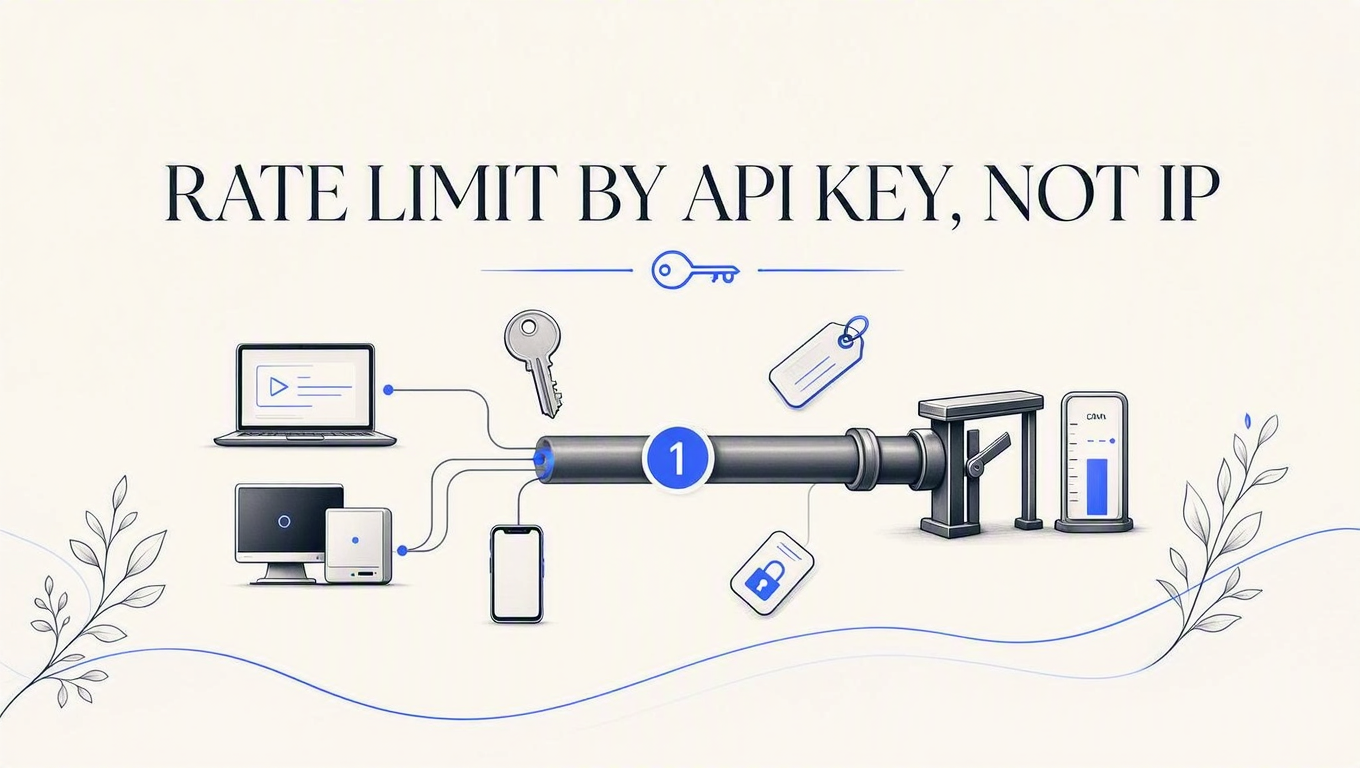
Rate limit by API key, not IP: what four frameworks do by default
A brand-new customer's very first API call came back 429, because somebody else had already spent the bucket from the same IP address. Four frameworks, four probes, and the fix for each.

Sorower
Co-founder
In this article
- The receipt
- Why an IP address is not a customer
- Both proxy settings are wrong
- "But my load balancer is the only hop. Isn't the header safe then?"
- The real reason the default is IP
- What each framework actually does, measured
- Express 5.2.1 + express-rate-limit 8.6.1
- Django REST Framework 3.17.1
- NestJS 11 + @nestjs/throttler 6.5.0
- Laravel 13.23.0
- How to rate limit by API key in each framework
- Do not bucket on an unvalidated string
- Express
- Django REST Framework
- NestJS
- Laravel
- What breaks next: one server becomes three
- "Where should the limit live: the key, or the customer?"
- Where ReqKey sits in this
- Key takeaways
- Try the fix without writing the limiter
Your newest customer signed up eleven minutes ago. They generated a key, pasted it into a cURL command, and called your API for the first time in their life. Your server answered 429 Too Many Requests.
They did nothing wrong. Somebody else did, from the same IP address.
The fix is to rate limit by API key, not IP, and the reason almost nobody does is that every server framework ships the other way round. I ran the same probe against Express, Django REST Framework, NestJS and Laravel this week. All four bucket their built-in rate limiter on a network identifier by default, which means the identity your auth layer works so hard to establish never reaches the component that decides whether to refuse the request.
Here is that brand-new customer's first request, measured.
The receipt
Express 5.2.1, express-rate-limit 8.6.1, Node 26.0.0. A limiter set to 3 requests per minute, mounted the way every tutorial mounts it: before the auth middleware. Two customers, two different valid keys, one shared egress IP. Customer alpha goes first.
key_alpha request #1 -> 200  RateLimit: "3-in-1min"; r=2; t=60
key_alpha request #2 -> 200  RateLimit: "3-in-1min"; r=1; t=60
key_alpha request #3 -> 200  RateLimit: "3-in-1min"; r=0; t=60
key_bravo request #1 -> 429  RateLimit: "3-in-1min"; r=0; t=60
key_bravo request #2 -> 429  RateLimit: "3-in-1min"; r=0; t=60
Read the fourth line again. Customer bravo has never sent a request, and the server is telling them they have zero remaining out of three. The RateLimit header is honest about the arithmetic and completely wrong about whose arithmetic it is.
This is not an Express problem. It reproduces in Django REST Framework, in NestJS, and in Laravel, with slightly different mechanics and identical consequences. I will show all four. First, why the identifier is wrong in the first place.
Why an IP address is not a customer
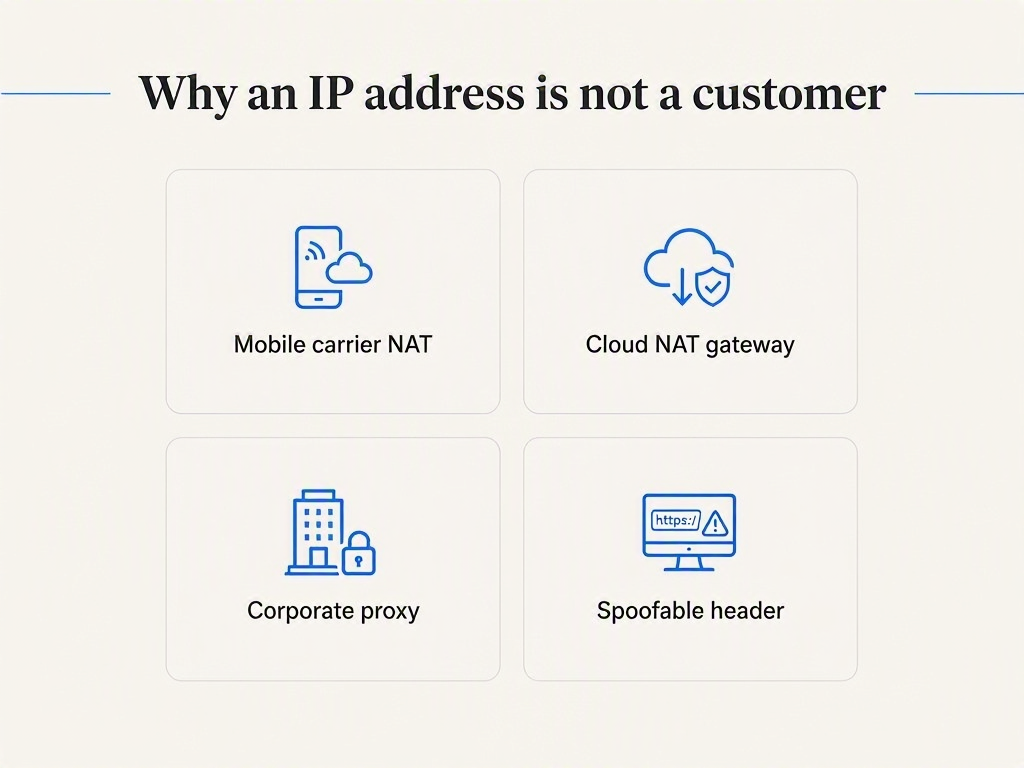
A source address answers "where did these packets come from," which is a routing question. Rate limiting asks "who is this, and have they had their share," which is a billing question. Those are different questions, and most rate limiters answer the first one while pretending it settles the second.
Four things break the pretence, and every one of them is normal infrastructure rather than an attack:
- Carrier-grade NAT. Mobile networks put large numbers of subscribers behind shared address space set aside for exactly this purpose in RFC 6598. If your API has a mobile SDK, "one IP" can mean an entire region of a carrier's customers.
- Cloud egress. Your customer runs their integration on a container platform. Their whole fleet leaves through one NAT gateway. Ten of their services now share one bucket with each other, which at least is fair. They also share it with any other tenant behind the same gateway, which is not.
- Corporate proxies. An entire office of engineers hitting your API looks like a single very enthusiastic caller.
- The header is a lie by design.
X-Forwarded-Foris set by whatever sat in front of you, and if nothing did, it is set by the caller. MDN says this plainly: the header is not trustworthy unless every hop between the client and you is under your control.
Here is the industry truth nobody wants to say out loud: every framework's built-in rate limiter was designed for a browser-facing web app, where the caller is a person, the traffic is residential, and the threat is a script kiddie hammering a login form. You are building an API. Your callers are servers. Same code, different threat model, and the identifier that was merely imprecise for the web app is actively wrong for you.
Both proxy settings are wrong
The standard advice when you discover IP bucketing behind a load balancer is to turn on proxy trust so the limiter reads the real client address out of X-Forwarded-For. I tested that too. It trades one failure for a worse one.
Same Express app, limit 3 per minute, two scenarios:
trust proxy | Scenario | Statuses (5 requests) | What it means |
|---|---|---|---|
| off (default) | 2 customers, 1 shared egress IP | 200,200,200,429,429 | Bucket shared. Wrong customer refused. |
| off (default) | 1 customer, rotating X-Forwarded-For | 200,200,200,429,429 | Limit holds, but see row 1. |
| on | 1 customer, rotating X-Forwarded-For | 200,200,200,200,200 | Limit gone. Bypassed with a header. |
| on | 2 customers, 1 shared egress IP | 200,200,200,429,429 | Still shared. Nothing was fixed. |
Off, unrelated customers collide. On, anyone bypasses you by incrementing a header they control. There is no third setting, because the setting is not the problem. The input is.
Credit where it is due: express-rate-limit is the only library in this set that notices. Run it with proxy trust off while a request carries the header and it throws a validation warning to stderr; turn proxy trust fully on and it throws a different one, which says the setting "allows anyone to trivially bypass IP-based rate limiting" and links its own documentation on the problem. Both warnings fired in my probes. Both requests were served anyway, with the statuses in the table above. The library is telling you the truth in a channel nobody reads in production.
"But my load balancer is the only hop. Isn't the header safe then?"
Safer, yes. Sufficient, no. If you configure trust for exactly your load balancer's address rather than blanket-trusting everything, the header stops being forgeable and you are back to row 1 of that table: accurate client IPs that still do not tell you which customer is calling. Fixing spoofability fixes a security bug. It does not turn a network address into an identity.
The real reason the default is IP
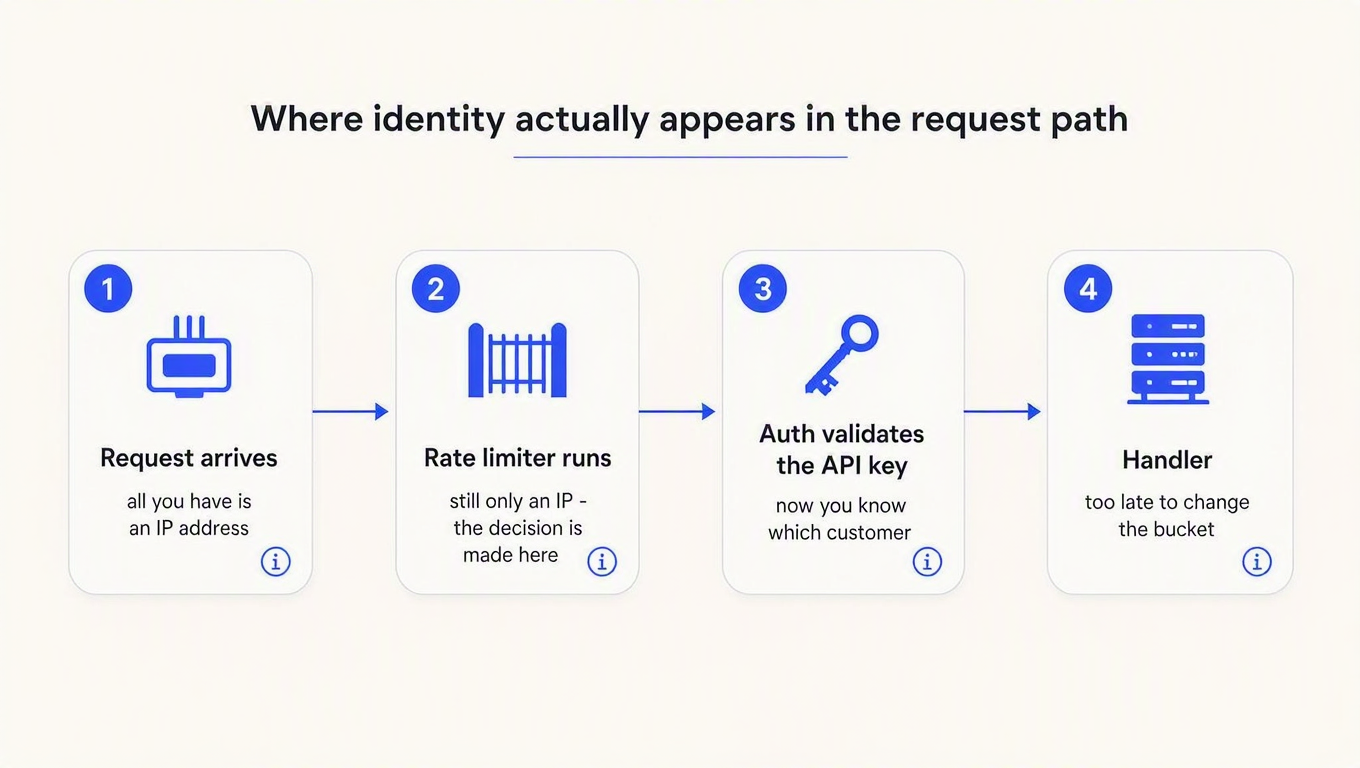
It is not laziness. It is ordering.
At the moment the limiter runs, the API key has not been validated yet. Your framework has a socket, a set of headers and a path. It does not have a customer. IP is not the identifier the framework chose over a better one; it is the only identifier that exists that early in the request. The default is a symptom of where the component sits, which is why "just configure it to use the key" is only half an instruction. You have to move it too.
And in one of these four frameworks, you cannot move it by declaring it later, because the framework re-sorts your middleware behind your back.
What each framework actually does, measured
Four probes, four different mechanisms, one outcome. All statuses below are real, from apps I ran.
Express 5.2.1 + express-rate-limit 8.6.1
Order is declaration order, so this one is entirely your own doing. Every tutorial writes app.use(limiter) near the top of the file (it feels like a security thing, and security things go first), and the auth middleware lower down. The limiter therefore runs before req.consumer exists. Result: the 429-on-first-request receipt at the top of this post.
Django REST Framework 3.17.1
The subtlest of the four, because it looks like it is working. If you check the API key in a DRF permission class (which is what the popular packages do), the check returns a boolean and throws the identity away. A successful request comes back 200 with request.user still set to AnonymousUser. UserRateThrottle then reads request.user.pk when authenticated and falls back to the network identifier when not, so authenticated API traffic silently takes the anonymous branch forever.
Measured at 3 per minute: key1 got 200, 200, 200; key2's first request got 429. Throttled responses carried Retry-After: 60, which is at least correct about the wait.
There is a second DRF finding worth your attention. With NUM_PROXIES left at its default, the throttle builds its identifier from the whole X-Forwarded-For header, so rotating that header gave 6 successes out of 6 against a 3-per-minute limit. That is the same bypass as the Express table, arriving through a different door. The full walkthrough is in the DRF post.
NestJS 11 + @nestjs/throttler 6.5.0
Same 2x2 as Express, because Nest sits on Express. Five requests with a rotating X-Forwarded-For at limit 3: proxy trust off gave 200,200,200,429,429, proxy trust on gave 200,200,200,200,200. Nest's own wrinkle is that the throttler and your auth check are both guards, so the fix depends on getting one guard to run before the other rather than on moving a middleware. More on Nest's layer ordering in the guard, middleware or interceptor post.
Laravel 13.23.0
This is the one where the framework does it to you.
Declare a route as ->middleware(['apikey.resolving', 'throttle:3,1']) and you would reasonably expect your key resolver to run first. It does not. ThrottleRequests is listed in the kernel's middleware priority array and your custom middleware is not, so Laravel re-sorts and runs the throttle first. My execution log recorded throttle ran; user=NULL before apikey.resolving ran.
ThrottleRequests then does exactly what it says it will: it uses the authenticated user's identifier if there is one, and falls back to domain plus IP if there is not. Three requests on key alpha returned 200, 200, 200. Key bravo's first ever request returned 429, from the same address. Written up in full in the Laravel post.
If you want the algorithm background rather than the identity problem, this explainer is a solid 16 minutes on windows, buckets and throttling in general:

How to rate limit by API key in each framework
Two rules cover all four fixes. Authenticate before you throttle, and throttle on the resolved consumer, not on the raw header. The second rule matters more than it looks, so take it first.
Do not bucket on an unvalidated string
The tempting one-liner is to key the limiter on X-API-Key directly. It works, and it is a trap: an attacker sends a different garbage key on every request and mints a fresh bucket each time, which is the header-rotation bypass wearing a new hat. Worse, your limiter store now grows with attacker-supplied cardinality.
Validate first. Reject unknown keys with a 401 before the limiter ever sees them. Then bucket on the consumer identifier the validation returned, which is a value the caller cannot invent.
Express
import express from 'express'
import rateLimit from 'express-rate-limit'

const app = express()

// 1. Auth first. This 401s unknown keys and sets req.consumer.
app.use(authenticate)

// 2. Then throttle, on the identity auth just resolved.
app.use(rateLimit({
  windowMs: 60_000,
  limit: 3,
  standardHeaders: 'draft-8',
  legacyHeaders: false,
  keyGenerator: (req) => req.consumer,
}))

app.get('/data', (req, res) => res.json({ ok: true }))
Same two customers, same shared IP, same request sequence as the receipt at the top of this post:
key_alpha request #1 -> 200  RateLimit: "3-in-1min"; r=2; t=60
key_alpha request #2 -> 200  RateLimit: "3-in-1min"; r=1; t=60
key_alpha request #3 -> 200  RateLimit: "3-in-1min"; r=0; t=60
key_bravo request #1 -> 200  RateLimit: "3-in-1min"; r=2; t=60
key_bravo request #2 -> 200  RateLimit: "3-in-1min"; r=1; t=60
Compare line 4 with line 4 of the first listing. Bravo's counter now starts at 2 remaining instead of 0, because bravo has their own bucket. That is the entire fix in Express: one option, and moving one app.use call above another.
Django REST Framework
DRF's throttle is already correct. It just needs request.user to be somebody. The insight is that request.user does not have to be a Django User, or touch your database at all. It needs is_authenticated and a pk.
from rest_framework import exceptions
from rest_framework.authentication import BaseAuthentication


class ApiConsumer:
    """A principal that is not a person. No users table involved."""
    def __init__(self, consumer_id):
        self.pk = consumer_id
        self.is_authenticated = True


class ApiKeyAuthentication(BaseAuthentication):
    def authenticate(self, request):
        key = request.headers.get("X-API-Key")
        if not key:
            return None                      # let other authenticators try
        consumer_id = resolve_consumer(key)  # your lookup or provider call
        if consumer_id is None:
            raise exceptions.AuthenticationFailed("Invalid API key")
        return (ApiConsumer(consumer_id), key)

    def authenticate_header(self, request):
        # Without this, missing credentials answer 403 instead of 401.
        return "ApiKey"
Wire it as DEFAULT_AUTHENTICATION_CLASSES, keep UserRateThrottle exactly as it is, and the bucketing corrects itself: alpha now 429s on its own fourth request while beta's first request still returns 200 from the same address. The DRF throttling docs cover the rate syntax.
NestJS
import { Injectable } from '@nestjs/common'
import { ThrottlerGuard } from '@nestjs/throttler'

@Injectable()
export class ConsumerThrottlerGuard extends ThrottlerGuard {
  protected async getTracker(req: Record<string, any>): Promise<string> {
    // req.consumer is set by the auth guard registered before this one.
    return req.consumer ?? req.ip
  }
}
Register it after the auth guard. The ?? req.ip fallback is deliberate: unauthenticated routes still deserve a limit, and IP is genuinely the best available identifier when there is no key. That is the one job IP is still right for.
Laravel
Laravel needs you to win the ordering fight first. The cleanest way is a marker interface: Illuminate\Contracts\Auth\Middleware\AuthenticatesRequests is empty, exists purely to slot middleware into the priority array directly above ThrottleRequests, and implementing it flips the order.
use Illuminate\Contracts\Auth\Middleware\AuthenticatesRequests;

class ResolveApiKey implements AuthenticatesRequests
{
    public function handle(Request $request, Closure $next)
    {
        $consumer = resolve_consumer($request->header('X-API-Key'));
        if (! $consumer) {
            return response()->json(['error' => 'invalid_api_key'], 401);
        }
        $request->setUserResolver(fn () => $consumer);
        return $next($request);
    }
}
After that change the log order reverses, the throttle sees a resolved principal, and alpha gets its own bucket (200/200/200/429) while bravo's first request returns 200 from the same IP. The object you hand to setUserResolver only needs Laravel's Authenticatable contract; the throttle calls getAuthIdentifier() and nothing else, so no Eloquent model and no users row are required. Worth knowing: Laravel's 429 emits the legacy X-RateLimit-* headers plus Retry-After rather than the newer structured RateLimit field, which matters if your clients parse them. We went through that response format in detail in the 429 post, and Laravel's routing docs cover named limiters.
What breaks next: one server becomes three
Everything above stores counters in the process. That is fine until you scale out, at which point a limit of 100 per minute quietly becomes 300 per minute across three instances, and a customer who lands on a cold instance gets a fresh allowance.
Moving the counter to a shared store fixes the arithmetic and introduces the next question, which is what your API does when that store is unreachable. We wrote both halves already: an atomic sliding-window limiter for the counter itself, and fail open or fail closed for the failure path. The short version of the second one is that you should decide before the incident, not during it.
"Where should the limit live: the key, or the customer?"
Almost always the customer. A customer with four keys (production, staging, CI, that one contractor) expects one allowance across all four, not four independent allowances they have to reason about. Attaching the limit to the key means their quota changes every time they rotate credentials, which is a support ticket waiting to happen. There is a longer argument for this, including where per-key sub-limits do make sense, in where the limit actually belongs.
Where ReqKey sits in this
ReqKey does the validation and the throttle in the same call, which sidesteps the ordering problem rather than solving it: there is no window in which the limiter knows less than the auth layer, because they are the same hop.
The limit lives on the consumer as rateLimit: {limit, window}, with the window in seconds. It is shared by every key that consumer owns, and it is enforced as a sliding window. Set it when you create the consumer, update it later, or inherit it from a plan:
curl -X POST "https://api.reqkey.com/consumer/update" \
  -H "Authorization: Bearer reqkey_..." \
  -H "Content-Type: application/json" \
  -d '{"consumerId":"con_...","rateLimit":{"limit":100,"window":60}}'
Then every POST /key/validate call from your middleware enforces it. Over the limit, you get a 429 with {"valid": false, "rateLimited": true} plus Retry-After, X-RateLimit-Limit, X-RateLimit-Remaining (always 0 on a 429) and X-RateLimit-Window. Two design decisions worth naming, because they are the ones that bite people elsewhere:
- 429s are free. A rate-limited request consumes no credits and no rate-limit quota, so a client that slows down recovers immediately and does not pay for being refused.
- Credits and rate limits are independent axes. Credits meter how much; the rate limit meters how fast. A consumer with unlimited credits can still be throttled, which is usually what you want for an enterprise customer on a flat contract.
Two honest limitations. Rate limits are consumer-level only, so if you specifically want a lower ceiling on one key than another, you need two consumers. And each region enforces its own window, so a caller who deliberately sprays across regions can reach up to the limit multiplied by the number of regions. For fairness and cost control that is a rounding error; for stopping a determined abuser it is not, and you should know which problem you are solving. The consumer API docs and the error reference have the rest, and the Node SDK maps the 429 through for you with the Retry-After intact.
Key takeaways
- Your framework's rate limiter is bucketing on IP right now, and you did not choose that. Express, DRF, NestJS and Laravel all default to a network identifier. Send two different valid keys from one address and watch the second customer get a 429 on their first request. It takes five minutes to reproduce and it is the fastest way to convince a skeptical teammate.
- Turning on proxy trust makes it worse, not better. Off, unrelated customers share a bucket. Fully on, anyone bypasses the limit by incrementing a header. Trust your load balancer specifically if you must, but do not mistake that for a fix.
- The default is an ordering problem, not a configuration problem. The limiter runs before the key is validated, so IP is the only identifier that exists yet. Move auth in front of the throttle, and in Laravel check the middleware priority array before you assume declaration order won.
- Bucket on the validated consumer, never the raw header. Keying on
X-API-Keydirectly lets an attacker mint a new bucket per request and fills your limiter store with garbage. Validate, then bucket on what came back. - Keep IP for anonymous traffic. It is still the right identifier for unauthenticated endpoints, signup forms and pre-auth abuse filtering. It is only wrong once you know who is calling.
Try the fix without writing the limiter
If you would rather not run a counter store and a fallback path for it, ReqKey enforces the limit on the consumer during key validation, so identity and throttling arrive in the same call. The free tier includes 100,000 requests a month, which is enough to point two keys at one endpoint from one machine and confirm that the second customer no longer pays for the first one's traffic. That is the experiment that matters here, and it takes about ten minutes.
Worth knowing before you size it: a request means one key validation or one logged API call, so if you run the SDK in its default mode (validate plus analytics), one incoming customer request costs two. See how key management works for the rest of the model.