NestJS API key authentication: guard, middleware, or interceptor?
Every NestJS tutorial puts API key validation in a guard and stops there. The layer you pick decides your status codes, your usage bill, and whether a stranger can map your routes.

Sorower
Co-founder
In this article
- The four layers, and what each one can actually see
- NestJS API key authentication guard: get the status code right first
- Why the same check in middleware quietly rots
- Past the hardcoded array: storage, lookup, revocation
- The one nobody writes about: your guard is billing for requests that 400
- A bonus the guard hands you free
- Your global guard never runs on routes that do not exist
- Registering the guard: APP_GUARD, not useGlobalGuards
- Rate limit by key, not by IP
- When to stop building this
- Two honest caveats
- Key takeaways
- Try the ordering yourself
A customer emails you: "your API is rejecting my key and my HTTP client won't retry." You check the logs. The key is fine. The key is missing, because their config loader silently dropped it. Your guard did exactly what every NestJS tutorial told it to do, which was return false, and NestJS turned that into 403 Forbidden. Their client library treats 403 as "you are not allowed, stop asking" and never prompts for credentials again.
Ten characters of code. One wrong status class. Two days of support.
NestJS API key authentication looks like a solved problem: write a guard, implement CanActivate, compare a header to a string. Every ranking tutorial stops right there. What none of them cover is that NestJS gives you four places to put that check, each one sees a different amount of the request, and the layer you pick quietly decides your status codes, your usage bill, and whether a stranger with no key at all can map every route you have.
Everything below was verified on NestJS 11.1.28 with Express 5.2.1, @nestjs/throttler 6.5.0, and Node 26. The outputs are real.
The four layers, and what each one can actually see
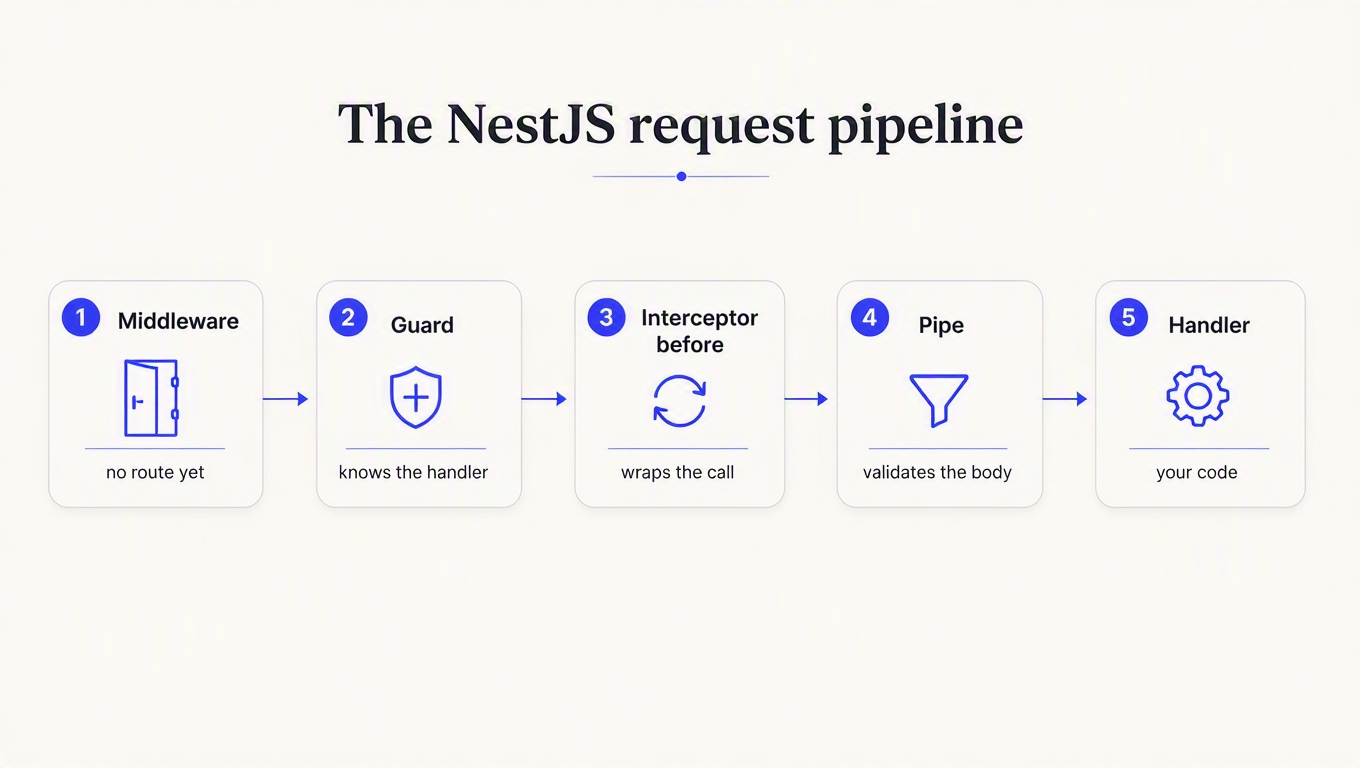
NestJS runs an incoming request through middleware, then guards, then interceptors, then pipes, then your handler. That order is not trivia. It determines what information is available when your check runs.
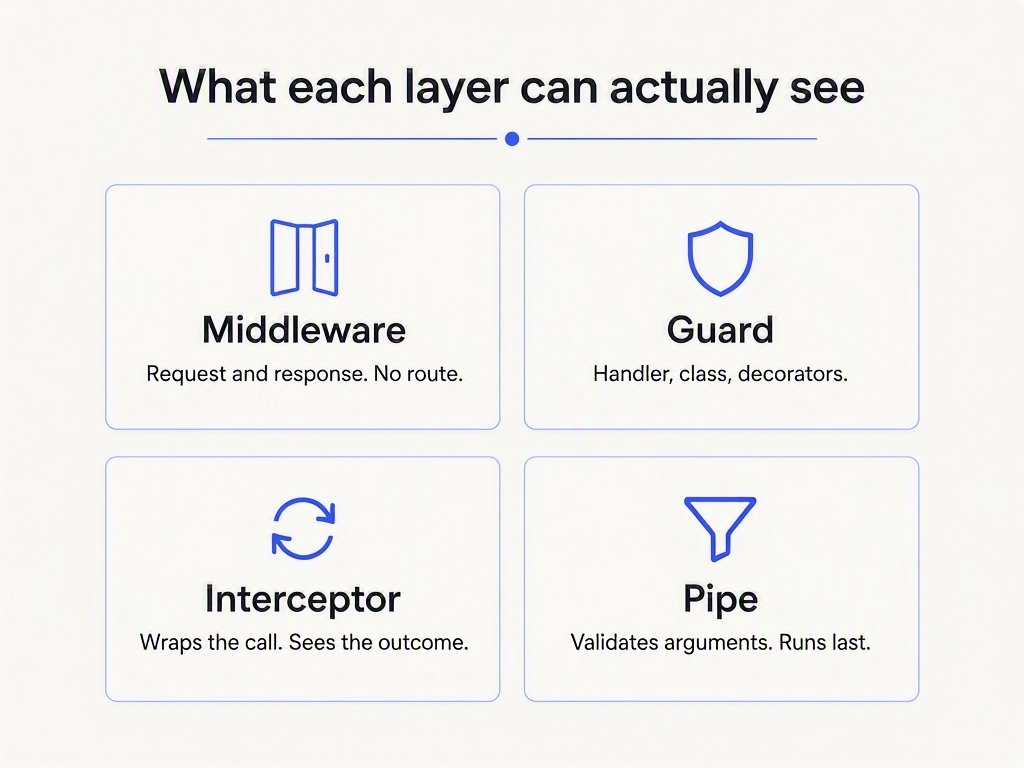
| Layer | Sees the route? | Sees decorators? | Sees the outcome? | Right job |
|---|---|---|---|---|
| Middleware | No | No | Response object only | Blanket, path-based work |
| Guard | Yes | Yes, via Reflector | No | Allow or deny |
| Interceptor | Yes | Yes | Yes, wraps the handler | Metering, logging, shaping |
| Pipe | Yes | Yes | No | Validating arguments |
I put a counter in a Nest middleware and asked it what it had. The answer was three arguments and nothing else:
{
  "hasExecutionContext": false,
  "argsAvailable": ["req", "res", "next"],
  "canReadHandlerMetadata": false,
  "routeKnown": null
}
routeKnown: null is the important one. Express has not dispatched to a route yet, so req.route is empty. Middleware knows a URL string. It does not know which controller is about to handle it, and it cannot read a decorator you put on that controller.
A guard, running a few microseconds later on the same request, knows all of it.
Marius Espejo's walkthrough of guards is the best free explanation of the mechanics if you want the broader authorization picture before wiring keys:

NestJS API key authentication guard: get the status code right first
Here is the guard almost everyone writes.
@Injectable()
export class ApiKeyGuard implements CanActivate {
  canActivate(ctx: ExecutionContext): boolean {
    const req = ctx.switchToHttp().getRequest();
    const key = req.header('x-api-key');
    if (!key) return false;              // <-- this line
    return key === process.env.API_KEY;
  }
}
Send a request with no key and read what comes back:
HTTP/1.1 403 Forbidden

{
  "message": "Forbidden resource",
  "error": "Forbidden",
  "statusCode": 403
}
Returning false from canActivate makes NestJS throw ForbiddenException. That is the framework's documented default and it is a perfectly reasonable one, because a guard is an authorization primitive. It is the wrong answer for a missing credential.
RFC 9110 splits these cleanly. 401 means the request lacked valid authentication and the client should try again with credentials. 403 means the server understood who you are and is refusing anyway, and repeating the request will not help. Client libraries act on that difference. A 401 triggers a credential refresh in most SDKs. A 403 gets surfaced to a human.
So throw the exception you mean, and send the header the spec requires with it:
@Injectable()
export class ApiKeyGuard implements CanActivate {
  constructor(
    private readonly reflector: Reflector,
    private readonly keys: KeyStore,
  ) {}

  async canActivate(ctx: ExecutionContext): Promise<boolean> {
    const isPublic = this.reflector.getAllAndOverride<boolean>(IS_PUBLIC, [
      ctx.getHandler(),
      ctx.getClass(),
    ]);
    if (isPublic) return true;

    const req = ctx.switchToHttp().getRequest();
    const res = ctx.switchToHttp().getResponse();
    const presented = req.header('x-api-key');

    if (!presented) {
      res.setHeader('WWW-Authenticate', 'ApiKey realm="api"');
      throw new UnauthorizedException('An API key is required.');
    }

    const consumer = await this.keys.resolve(presented);
    if (!consumer) {
      res.setHeader('WWW-Authenticate', 'ApiKey realm="api"');
      throw new UnauthorizedException('Invalid API key.');
    }
    if (consumer.suspended) {
      throw new ForbiddenException('This key is suspended.');  // 403, correctly
    }

    req.consumer = consumer;
    return true;
  }
}
Now the two cases separate the way a client expects:
// no key at all
HTTP/1.1 401 Unauthorized
{ "message": "An API key is required.", "error": "Unauthorized", "statusCode": 401 }

// key present, key suspended
HTTP/1.1 403 Forbidden
{ "message": "This key is suspended.", "error": "Forbidden", "statusCode": 403 }
The nice thing about NestJS here is that an exception thrown from a guard lands in the normal exception layer and comes back as your formatted JSON body. Not every framework manages that. In Spring Boot, a security filter that throws never reaches your @RestControllerAdvice, because the handler lives downstream in the dispatcher. Nest gets this right by default.
Why the same check in middleware quietly rots
Plenty of guides suggest middleware for API key validation, on the reasonable grounds that it is the outermost layer and runs on everything. It does run on everything. That is the problem.
You always end up needing exceptions: a health check, a webhook receiver, the docs route. In a guard, you mark them and move on.
export const IS_PUBLIC = 'isPublic';
export const Public = () => SetMetadata(IS_PUBLIC, true);

@Controller()
export class HealthController {
  @Get('health')
  @Public()
  health() { return { ok: true }; }
}
I ran exactly this against a global guard and a middleware doing the same check. The guard read the decorator and let the request through with no key. The middleware ran anyway, saw nothing, and had no way to know the route was meant to be open. Its only tool is a path list, maintained by hand, in a different file from the route it describes.
That list is where the outage comes from. Someone renames /health to /healthz and the exemption silently stops matching, or someone adds /internal/* and it matches more than they meant. We hit the same class of bug from the other direction in Express, where the mount path decides whether your skip list matches at all. Path lists drift because nothing links them to the code they describe. A decorator cannot drift, because it moves with the handler.
Rule of thumb: if the answer depends on which route this is, use a guard. Middleware is for things that are genuinely true of every request.
Past the hardcoded array: storage, lookup, revocation
Comparing against process.env.API_KEY works right up until you have two customers. Then you need four things the tutorials skip, and they are worth naming because each one has a wrong answer that looks fine.
Storage. Hash the keys, but not with bcrypt or argon2. Those exist to slow down attacks on low-entropy human passwords. A generated API key already has 128+ bits of entropy, so there is nothing to brute force, and a deliberately slow hash on every single request is a self-inflicted latency tax. Store a fast SHA-256 hash with an indexed plaintext prefix, look up by prefix, then compare the hash. We made the full argument in the FastAPI post.
Constant-time comparison. Once you are comparing digests rather than raw keys, use crypto.timingSafeEqual. It throws if the two buffers differ in length, so compare fixed-width digests, never the keys themselves.
Revocation. A revoked key must stop working faster than your cache TTL, which means your cache TTL is a security parameter, not a performance knob. Pick it deliberately.
Outages. When the key store is unreachable, do not return 401. You do not know the key is invalid; you know you cannot tell. 401 tells the customer to go regenerate a key that was fine, and now you have a support queue on top of an incident. Return 503 with a Retry-After, or fail open on purpose. Both are defensible. Choose before the incident, not during it.
The one nobody writes about: your guard is billing for requests that 400
Here is where the layer choice stops being style and starts costing money.
Guards run before pipes. If you meter usage inside your guard, which is the obvious place because that is where you already resolved the customer, you are counting requests before anything has validated the body.
I wired a counter into a guard and an identical counter into an interceptor, then posted a body that fails ValidationPipe:
POST /billing/charge/abc123
{ "sku": "x", "qty": "nope" }

--> HTTP/1.1 400 Bad Request
{ "message": ["qty must be an integer number"], "error": "Bad Request", "statusCode": 400 }

guard metered:       1
interceptor metered: 0
handler ran:         0
The guard billed. The handler never ran. Your customer is looking at a 400 and a smaller credit balance, and from their side those two facts have no relationship to each other.
The same route with a valid body:
--> HTTP/1.1 201 Created

guard metered:       1
interceptor metered: 1
handler ran:         1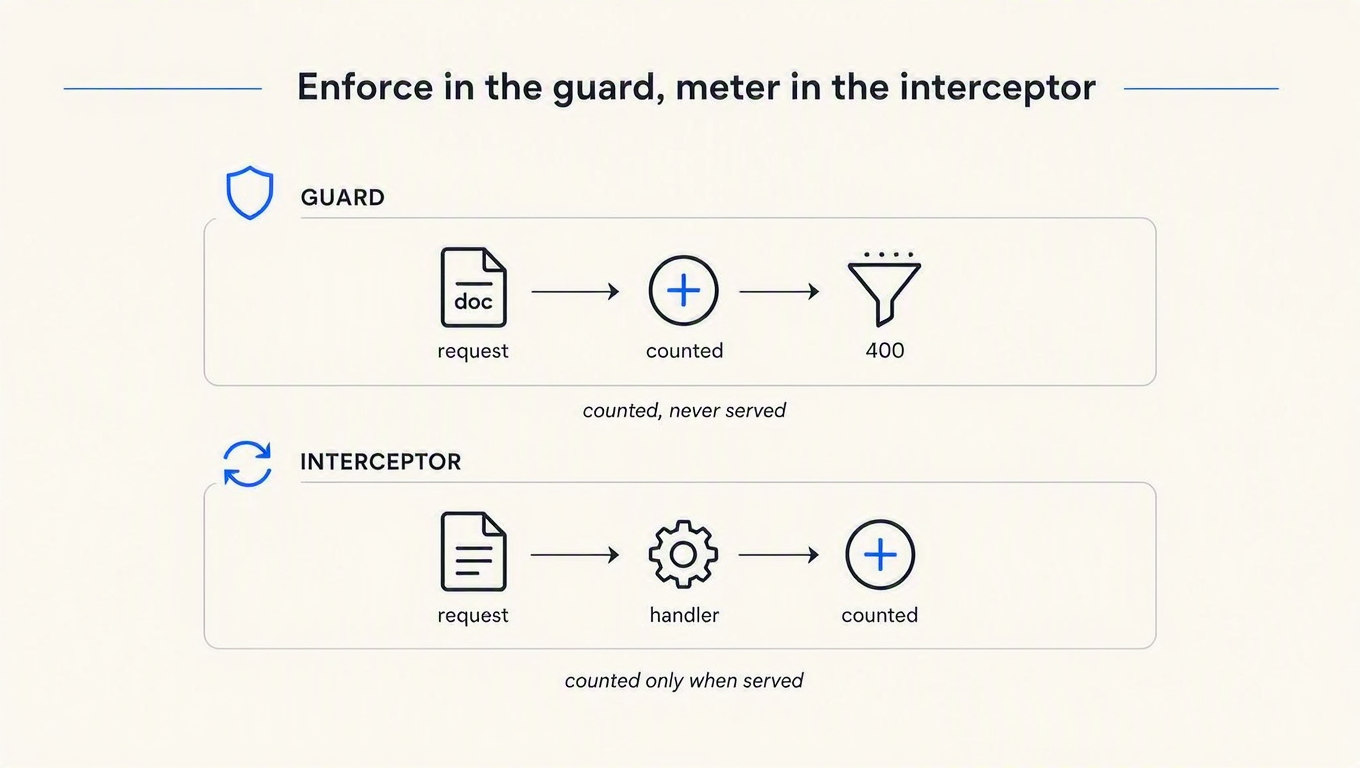
So split the job across two layers, which is the shape the pipeline was asking for the whole time:
@Injectable()
export class MeteringInterceptor implements NestInterceptor {
  constructor(private readonly usage: UsageService) {}

  intercept(ctx: ExecutionContext, next: CallHandler) {
    const req = ctx.switchToHttp().getRequest();
    return next.handle().pipe(
      tap({
        next: () => this.usage.record(req.consumer, ctx, 'ok'),
        error: (err) => this.usage.record(req.consumer, ctx, err.status ?? 500),
      }),
    );
  }
}
Enforce in the guard. Meter in the interceptor. The guard answers "may this request proceed," which it can decide with nothing but the key. The interceptor answers "what did we actually serve," which nobody can know until the handler returns.
This is not a NestJS quirk. It is the general problem that every credit system charges before it knows the request worked, and Nest's pipeline just makes the seam unusually easy to see. Deciding whether a validation failure is billable is a real product call, and reasonable companies land on both sides. Deciding it by accident, because the counter happened to be in the guard, is the part to avoid.
A bonus the guard hands you free
While it is running, the guard already knows the route template, which is exactly the low-cardinality label your usage analytics want:
{
  "rawUrl": "/billing/charge/abc123",
  "controllerPath": "billing",
  "handlerPath": "charge/:id",
  "handlerName": "charge",
  "expressRoutePath": "/billing/charge/:id"
}
Group usage by /billing/charge/:id and you get one series. Group it by rawUrl and you get one series per customer ID that ever hit the route, which is how observability bills get interesting. Note that expressRoutePath is populated here but was null in middleware on the same request. Routing has happened by the time a guard runs.
Your global guard never runs on routes that do not exist
This one surprised me, and I have not seen it written down anywhere.
With a global guard registered and no API key presented at all:
GET /me              --> 403  { "message": "Forbidden resource", ... }   guard ran: 1
GET /no-such-route   --> 404  { "message": "Cannot GET /no-such-route" } guard ran: 0
Guards are attached to route handlers. No handler, no guard, so Nest's 404 goes straight back to an unauthenticated caller. The difference between those two responses is a route existence oracle: anyone can spray paths and learn your entire surface from the status code, without ever holding a key.
For most APIs that is a shrug, since your routes are in public docs anyway. If your paths encode something you would rather not publish, such as internal tenant names or unreleased endpoints, you want the blanket layer after all. This is the narrow case where middleware is the right tool: it runs on unmatched routes, because it runs before routing exists.
Registering the guard: APP_GUARD, not useGlobalGuards
Two ways to make a guard global. They are not equivalent, and the difference only shows up at runtime.
// Works. The container constructs it, so Reflector and KeyStore get injected.
@Module({
  providers: [KeyStore, { provide: APP_GUARD, useClass: ApiKeyGuard }],
})
export class AppModule {}

// Compiles. Then explodes on the first request.
app.useGlobalGuards(new ApiKeyGuard());
The second form constructs the guard yourself, outside the DI container, with no arguments. TypeScript is happy because you never told it otherwise. The first request produces:
TypeError: Cannot read properties of undefined (reading 'getAllAndOverride')this.reflector is undefined. So is your key store. If you have ever wondered why the docs push APP_GUARD so hard, this is why: a guard that needs to look anything up needs the container, and any guard doing real API key authentication needs to look things up.
Spring developers will recognise the shape. Registering a filter at the wrong scope there gets it running twice per request. Same lesson, different framework: how you register the thing is part of what it does.
Rate limit by key, not by IP
Once keys work, someone adds @nestjs/throttler. Its default tracker uses the request IP, and both possible configurations of that are wrong for an API whose callers are servers.
I set a limit of 3 requests per 60 seconds and fired 5, rotating X-Forwarded-For on each one.
| Configuration | Client | 5 request statuses | Result |
|---|---|---|---|
trust proxy off (default) | rotating XFF | 200, 200, 200, 429, 429 | Limit held, but every caller shares one bucket |
trust proxy on | rotating XFF | 200, 200, 200, 200, 200 | Limit bypassed entirely |
trust proxy on | stable client | 200, 200, 200, 429, 429 | Limit held |
Leave trust proxy off and every request appears to come from your load balancer, so all your customers share a single bucket and the noisiest one throttles everybody else. Turn it on so you can see real client IPs, and a header the caller fully controls becomes a free bypass. There is no third setting that fixes this, because the input is wrong.
You already have an identifier the caller cannot forge, and you validated it two layers ago:
@Injectable()
export class ConsumerThrottlerGuard extends ThrottlerGuard {
  protected async getTracker(req: Record<string, any>): Promise<string> {
    return req.consumer?.id ?? `ip:${req.ip}`;   // key first, IP only for anonymous routes
  }
}
Order matters: this guard has to run after the one that sets req.consumer. We found the identical failure in Django REST Framework, where a validated key that never reaches request.user silently falls back to IP bucketing. Two frameworks, same default, same wrong answer. And when you do return a 429, send the headers that tell the client when to come back.
When to stop building this
Everything above is maybe 300 lines you now own: a key store, hashing, a prefix index, revocation propagation, a metering interceptor, usage aggregation, a per-consumer throttler, and the dashboard your support team will ask for in month two. It is a genuinely reasonable thing to build. It is also a two-day project that ships in six weeks.
The alternative is to put that layer behind an API. ReqKey's Node SDK ships a Nest module that validates the key, meters the request, and hands the decision to your controller:
import { ReqKeyModule, ReqKeyDecision, ReqKeyRequestId } from 'reqkey/nestjs';
import type { VerificationResult } from 'reqkey';

@Controller('payments')
class PaymentsController {
  @Get()
  list(
    @ReqKeyDecision() decision: VerificationResult | undefined,
    @ReqKeyRequestId() requestId: string | undefined,
  ) {
    return { payments: [], requestId, creditsRemaining: decision?.creditsRemaining };
  }
}

@Module({
  imports: [
    ReqKeyModule.forRoot({
      projectKey: process.env.REQKEY_PROJECT_KEY,
      apiId: 'api_payments',
      mode: 'both',
      keyName: 'X-Acme-Key',
      excludePaths: ['/health', '/docs/*'],
    }),
  ],
  controllers: [PaymentsController],
})
export class AppModule {}
Booting that against a project and calling it gives you the status codes this article has been arguing for, without you writing them:
GET /health      --> 200  { "ok": true }                    // excluded, no key needed
GET /payments    --> 401  { "error": "missing_api_key", "message": "An API key is required." }
// key store unreachable, failureMode: "closed"
GET /payments    --> 503  { "error": "reqkey_unavailable",
                            "message": "API key verification is temporarily unavailable." }
Use forRootAsync with inject: [ConfigService] if your project key comes from a secrets manager. Under the hood a validation is a POST /key/validate against the ReqKey API, which returns the decision and the consumer's remaining balance:
{
  "valid": true,
  "requestId": "abc123xyz",
  "apiId": "api_payments",
  "creditsRemaining": 9995,
  "creditsLimit": 10000
}
Two honest caveats
First, the Nest integration is middleware, not a guard, and you just read an entire article on why that distinction matters. The consequence is exactly the one described above: it cannot read a @Public() decorator, so exemptions are configured as excludePaths or a shouldProtect resolver. That is the right trade for a blanket metering layer, since it also means it covers unmatched routes. It is the wrong trade if your exemptions are route-specific and change often. Nothing stops you from combining the two: let the module meter everything, and keep a small guard for route-aware authorization.
Second, in the default mode: 'both', one request from your customer costs two billable ReqKey requests, one validation and one analytics event. That is worth knowing before you read the pricing page and do the arithmetic with the wrong number. Set mode: 'validate' if you do not want the traffic analytics.
Key takeaways
return falsein a guard sends 403, and a missing key deserves 401. The default is a reasonable framework choice and the wrong answer for absent credentials, because 401 tells a client to retry with credentials while 403 tells it to give up. ThrowUnauthorizedExceptionwith aWWW-Authenticateheader instead.- Put route-dependent decisions in a guard, never in middleware. Middleware gets
req,res, andnext, with no route and no decorators, so every exemption becomes a hand-maintained path list that drifts away from the routes it describes. - Enforce in the guard, meter in the interceptor. Guards run before pipes, so a counter in your guard bills for requests that a
ValidationPiperejects with a 400. Verified: guard metered 1, handler ran 0. - Register global guards with
APP_GUARD, notuseGlobalGuards(new Guard()). The second bypasses the DI container and every injected dependency arrivesundefined, which TypeScript will not catch for you. - Throttle on the validated key, not the IP. With
trust proxyoff your customers share one bucket; with it on, a rotatingX-Forwarded-Forwalks straight past the limit. OverridegetTrackerand use the identifier the caller cannot forge.
Try the ordering yourself
The fastest way to believe the metering result is to reproduce it: drop a counter in a guard, another in an interceptor, and post a body your ValidationPipe will reject. Whatever the guard counted is what you would have charged for.
If the answer makes you want that layer to be somebody else's problem, ReqKey handles key validation, credits, and per-consumer limits behind one Nest module. The free tier includes 100,000 requests a month, which is enough to run the same experiment against a real key and watch the balance move. The docs and the key management overview cover the rest.